Author: Ryan

  • How did things get so bad that Apple became a better option?

    Bit of a weird title, I know. But I can’t think of a better way of wording it.

    At home I have 2 PC’s in regular use, using a 2 port KVM. One of those is my Linux gaming PC, running Ubuntu. The other is an M1 Mac Mini. I have an old Dell laptop buried away running Windows 10, that’s most definitely got a flat battery because it’s so infrequently turned on. I only use that for a label printer that only has Windows drivers and for my diagnostic tool that again, only supports Windows.

    Aside from that my partner has a Windows 11 laptop, she only uses that when she needs to write a letter or to perform a task that needs it. For the most part she’s one of these that just does everything on her phone. When my son is old enough there is zero chance he’ll be getting a PC running Windows. If he wants to game it’ll most likely be a Linux machine.

    In 2026 I can see absolutely no reason or benefit to someone using a Windows machine in a personal capacity. I understand it for work, a lot of the corporate world still revolves around it. Even in the workplace it’s becoming a hindrance. Forced obsolescence caused us to have to replace at least 50 PC’s when Windows 10 was deprecated, updates are constant, intrusive and generally break something.

    At work I have a desktop running Windows 10 LTSC (I cannot rely on Windows 11, I’ve tried) and a laptop. My requirements for a laptop aren’t demanding. Generally if I’m on my laptop I’m only using it to use a remote session either back to my desktop or a server. At a push I might check emails and do some web related tasks. All I really need from a laptop is decent battery life, reliability and portability. For the past few years I have been in a constant battle to find a Windows laptop that meets those basic requirements. They either drain the battery when turned off, have a horrendous battery life when on, won’t turn on when I need them to due to hardware issues or have just broken.

    My last laptop was a 2025 Lenovo something or other. It’s a far cry from the Thinkpads of old. The RAM, CPU and SSD are soldered to the board. The battery is glued in place. The keyboard is bad. It drains its battery when off, and has a habit of refusing to power on even when charged. As far as a tool goes, it’s terrible.

    So when a Macbook Air M2 2022 was handed back to me, I decided to give it a go. Straight away I could tell it had seen a lot. The keys were worn and sticky, thankfully Apple Self Repair sell replacement sets, so I ordered those. The battery was at 86% health but I decided to wait and see how that goes. I decided I’d use this device as a dual purpose laptop, both personal and work. 

    The Microsoft suite of apps have Mac versions and I feel like I have more control over how deeply they ingrain themselves into my OS. My VPN’s into the offices work fine, as do my RDP sessions. In fact, there hasn’t been a single piece of software that I use that hasn’t had a MacOS version. Most importantly, the battery life. Even with a partially degraded 4 year old battery this Macbook runs rings around every single Dell, HP or Lenovo I’ve ever owned. I don’t even have to power it down, I can just close the lid and come back to it a week later and it’ll still be charged. For the performance this laptop has it is bizarrely frugal with its energy usage.

    10 years ago I would never have even considered this move. Macs were things that arty people used, I had to occasionally navigate them when I had users that needed support but it was rare and it felt completely alien. That has definitely changed. I don’t know if it’s that Macs have got better, or just the fact that Windows and their OEM’s have become so bad and complacent that the alternatives are now more appealing.

    Microsoft needs to realise, and fast, that Windows 10 was exactly what people wanted. No-one likes ads baked into their OS, or a PC that idles at 40% usage, or Copilot being constantly shoved down our throats, or half the settings in “Settings” and the other half in “Control panel”. No-one asked them to reinvent the wheel, their core user base was the enterprises and unnecessary changes do not go down well with them. They tried it with Windows 8, and everyone avoided it like the plague. People just want a functional, minimal operating system that doesn’t get in the way of what they’re trying to do.

    At this point though I think it might already be too late for them. Microsoft has put all their eggs into the “AI” basket. Obviously maintaining a reliable and trustworthy operating system wasn’t impressing shareholders anymore. I think it’s time we all start looking to jump ship elsewhere.
  • Fallout Fans – Give the older titles a chance!

    If you hadn’t already gathered, I’m a bit of a geek. When it comes to games, I absolutely lap up deep lore. I’m the guy that spends ages reading in game books, and then starts binging deep dive long videos.

    Fallout is a series that caters to my desire for lore very well. without dating myself too much, when the first Fallout game released I was too young to play it. Fallout 3 was my first Fallout game, I can’t fully remember but I most likely played it on Xbox 360 (that and PS3 were dreadful ways of playing) and I vaguely remember having the DLC. I also played Fallout New Vegas when it released, but didn’t have the DLC at the time, and remember pretty much breaking my playthrough with some poor ingame decisions.

    Fallout 4 was what really drew me into the fictional universe. Some people don’t speak too highly of Fallout 4, saying it had moved too far away from its RPG roots. However, that exact point is what makes it more accessible to the masses and makes for an excellent entry point. Hell, I played it on a PC but with an Xbox controller because I didn’t even have a desk at the time. The same couldn’t be said for Fallout 1 or 2. Anyone stumbling here from the TV series wondering how to get into the games I’d highly recommend Fallout 4 as your starting point. If you enjoy it, then look to some of the earlier titles.

    There was so much to absorb in the game. From the books, terminals, different factions, multiple story endings and endless characters with their own deep storylines just makes the world seem rich and alive. Fallout 4 is a game I will revisit in time, I’ve yet to play any of the DLC but it will be a while before I get back round to it.

    Fallout New Vegas (which is what the TV series draws a lot from) is easily my favourite game in the series, and one of my favourite games of all time. The second time I played it (with all the DLC, which is all worth every penny) was on an Xbox Series X. I spent over a hundred hours on that play through, soaking everything up I could. The world building and story writing is top notch. The world feels real, and it sucks you in to a point where you’re fully invested in it.

    The beauty of these games though is that even after hundreds of hours played, you could pick one of these games up and have a completely different experience providing you make different choices throughout the story and play in a different style.

    Having played everything (minus Fallout 76 which I won’t play) from Fallout 3 onwards at least once, the original Fallout and Fallout 2 began to pique my interest. For a long time I’ve been put off by their age, rudimentary graphics and isometric style. I watched a couple of videos on Fallout 1 and decided to give it a go. Gaming on Linux brought additional challenges, but thanks to the community edition patch (highly recommended, get it here: https://github.com/alexbatalov/fallout1-ce) I was fully up and running with a comfortable experience.

    Immediately I was thrown out of my comfort zone. This game does not hold your hand. There is no tutorial whatsoever, you get a brief introductory video then you’re thrown into character creation with no explanation and then out into an open world with very little direction. There is logic behind this however. This game was released as physical media, back in a time when paper manuals were a thing. Thankfully if you buy the GoG version of the game, a digital version of this manual is included. I highly recommend you read it, or at least find out what you need to know from it. Once I did this my experience was a lot more comfortable and I could begin to enjoy the game for what it really is.

    Fallout (1) is an incredibly large and deep game for something released in 1997. There are no quest markers, getting stuck is a very real possibility and you need to pay attention to what characters say to you. With only a mild spoiler (warning!) I’ll provide an example: In a settlement called Junktown you will come across a building with a dog (Dogmeat) preventing anyone from entering. The owner of the building will ask you for help moving the dog on. Through conversation you learn the dogs previous owner was a traveller who was killed by a local crime boss. When you enquire more about the traveller he mentions that the owner wore a leather jacket, which he thought ridiculous considering the heat of the area. Approaching the dog it just growls, and there are no further interaction options. Initially I thought maybe I could appease the dog with food, but no luck. The leather jacket comment had stuck in my head for some reason. I had one of my companions (Ian) carrying some of my excess gear, and one of those items was a leather jacket. I took it back and equipped it. Dogmeat took me to be his owner, left his post guarding the door and became my companion. Quest completed. Had I not paid attention to the dialog I would’ve never even thought to try that.

    There is a dark humour to the original game that’s more prevalent than in the later titles too, it’s very witty and subtle but adds to the experience. Often there are dialog options which send conversations down strange, amusing paths, although I’d recommend saving regularly because one poor choice can get you in trouble fast, and combat can easily be initiated by a cheeky comment.

    I’ve also found myself enjoying the isometric style of the game. Yes it’s dated, and can be clunky, especially trying to find doors to buildings that are on the side you can’t see, or trying to differentiate a locker with key items in from the surrounding walls. That aside it’s a charming art style, it’s moody and to a large degree timeless. It was never aiming for realism and for that reason has aged fairly well, in a similar way that The Legend of Zelda: The Wind Waker will always look good.

    I will also admit that I’m a bit of a wimp when it comes to anything scary in games. The Sierra Madre DLC for New Vegas freaked me out to the point I struggled to get through it. First person adds an uncomfortable layer to the immersion for me, and leaves me very vulnerable to jump scares. The diagonal distance view and turn based combat slows down the pace for me to a point that I can just enjoy the game without freaking out about dark corridors or spooky noises. This won’t be a benefit to people that like fast paced games, but it certainly is to me.

    That draws me nicely to my conclusion. I’m yet to play Fallout 2, but from what I can gather it’s even better than Fallout (1). These older titles won’t be for everyone. However, if you’ve played the Bethesda Fallout titles, watched the TV series and are itching for more of the Fallout universe give it a try. You can usually get Fallout 1 and 2 for around £3 each, so not much of a commitment. Like me you might just find yourself really enjoying it, and the story and characters in these games add a lot of context to the later games and TV show.

  • Gaming on Linux – Surprisingly good!

    I built my gaming PC shortly after my son was born. So just over two years ago. I was sick of the constraints being placed on me by modern games consoles, including the lack of ownership of games, online subscriptions and limited backwards compatibility. I sold my Xbox Series X and using a combination of used and new parts put together a fairly capable rig for not a lot of money.

    At first I ran Windows 10, and largely had no issues. All the games I wanted to play (including Cyberpunk 2077 and Kingdom Come Deliverance!) played at max settings at over 60FPS, which was plenty good enough for me. Around this time Microsoft/Microslop announced they were discontinuing Windows 10, so I thought it would be best if I upgraded to Windows 11. I bought an external TPM2.0 card to avoid having to do workarounds and performed the upgrade.

    At first, aside from the awful UI differences it was business as usual. Until I started trying to play games. Every game I played had taken a serious hit to its frame rate. I tried to update my drivers and started running into more issues. Out of my 32GB RAM Windows was using about 10GB at idle. Updates were constant and annoying, things were breaking faster than I could troubleshoot them.

    Enough was enough. In absolute frustration I wiped the PC and installed Ubuntu. In hindsight I wish I’d taken a bit more time with this step because I lost some files and quite a few save games! I’ve used Linux mainly in Debian based flavours for many years now, and maintain a few Linux servers so I’m no stranger to Linux but what I’d never done was used it as my main operating system. I’d also never gamed on Linux before. I was prepared for a long battle with steep learning curves but I’ve been nothing but impressed.

    The games I play are very varied. I have some games on Steam, some DRM free games from GoG, some physical PC games and I also like to emulate older consoles up to the PS3.

    Steam was a walk in the park. Thanks to the Steamdeck being Linux based Steam supports Linux very well. There is absolutely no difference to what I’m used to. Thankfully I don’t play online games because I believe there are some problems with Kernel level anticheat systems working outside of Windows, but to be honest I wouldn’t want them on my system anyway.

    The DRM free and physical games for Windows have caused me no issues either. I discovered a program called Lutris which makes the process nearly pain free. You point it towards your installer, and Lutris pretty much does the rest. It configures your WINE environment, and then launches the installer, which in most of my experiences just installs as it would on a Windows system. Once installed Lutris then behaves similarly to Steam, giving you a central location to launch games on.

    Emulation has also been really impressive. Mainly I play PS1, PS2, PS3 and Gamecube exclusives. The emulators are just as good as the Windows versions.

    What I can safely say in all of my above use cases is that performance in game has been better and more consistent than it was in Windows. I get about 3-5 FPS better than I used to on Windows 10 and I don’t get any random slow downs.

    I can honestly say that there is nothing that Microsoft could do now that would tempt me back into their operating system. Ubuntu’s updates are quick and painless, very rarely even requiring a reboot. Drivers have become a non issue. My PC actually idles now, no creepy background processes hogging RAM and ramping up my CPU. No unaccounted for storage usage. Most importantly I can shut my PC down when I’m done with it, knowing with complete certainty that it’s not going to take hours doing updates, and it will turn back on without issue when I next need it.

    If you’re on the fence about it, I urge you to take the plunge. It’s liberating and refreshing to have an operating system that doesn’t feel like it’s actively working against you. If it weren’t for the fact I work in a Windows based environment I would gladly never touch a piece of Microsoft software again!

  • Changing my relationship with smartphones.

    I’ve talked at length about my unhealthy affliction of obsessing over smartphones and changing them far too often. So far I have been unable to pry myself away from it. I used to switch cars too, sometimes multiple times per year. Thankfully I would consider myself completely cured of that habit. My current car I’ve had for 3 years and I’m just as happy with it as the day I got it. I have no intention of getting rid of this car until it’s no longer economical to repair.

    My next goal is to achieve that same sentiment towards smartphones. After all, innovation has plateaued so there’s very little logical reason to switch them all the time. This issue is an emotional one, or more likely one that’s being manipulated by marketing and advertising.

    Across the globe we’re in difficult financial times, with an uncertain future. Bleeding money on depreciating assets is not a wise thing to do, although that’s exactly what this is. I have reclaimed the cash for the majority of smartphones I’d purchased and I’ve settled for a simple Samsung Galaxy A26. This was a work provided smartphone, so it’s actually cost me nothing. I am using an iPhone SE 2022 as my work phone, which I bought for £50 and I’m perfectly happy with so I decided to use the A26 as my personal phone.

    It’s nothing fancy, but it’s fast in daily use, has a nice screen, the battery lasts a long time and the cameras are good enough. It’s everything I need in a smartphone and nothing more, nothing less. I don’t do any demanding tasks on it (that’s all delegated to my desktop) so having ultimate performance isn’t a concern. All it really needs to be is a reliable communication device, which it is.

    A recent conversation on Reddit got me thinking about our daily relationship with our phones too. It was along the lines of “boomers” having a better relationship with their mobile phones than the following generations do, and that we should try to mimic that.

    Thinking of my Grandparents they use their phones in a way that is alien to us. For one, they share a phone, something unfathomable to the majority of us and something even I wouldn’t like to do. The phone has a place in the house, generally on a table somewhere and the charger will be there with it. The phone doesn’t go up and live on a bedside table at night. They have a deep mistrust of technology so private data and financial apps is a definite no (something I’ve already done).

    From that I plan to take a couple of things away from this. My phone doesn’t need to come to bed with me. I don’t use it as an alarm clock, and it slows my night time and morning routine down. It can get put on charge overnight, downstairs. I’ve also put one of those old person style wallet cases on my phone. It makes it less convenient. Having to open it every time I want to use it is another step to a process that might just cause me to leave it alone.

    The above, while beneficial doesn’t change my impulse purchasing of phones though. For that I need to address my exposure to marketing and advertising. For a long time my media topic of choice has been smartphones. I’d watch tech youtubers comparing phones, discussing future releases and reviewing current ones. I’ve now unsubscribed from all of them and removed them from my feed. I’ve also unsubscribed from any Smartphone related subreddits. What I want is for them to just completely fall off my radar, I don’t need to know what’s coming out or what features I’m missing out on, and I also don’t want to be reminded that my current device is now not the latest and greatest.

    Marketing is very clever, and while nothing I was consuming was directly advertising it was fulfilling the same purpose. It was keeping me well informed on all of these new expensive products and making me feel like I needed them. Although, Youtubers are generally sent their products for free because it directly benefits the phone companies, and Reddit could be 99% bots these days so who knows it literally could’ve just been disguised advertising all along. Either way, I feel like I’ve been played and manipulated against my will. While I don’t skirt away from the responsibility that I’ve had poor impulse control, I don’t think the odds were ever really in my favour.

    If I was doing this once a year, or every other year I wouldn’t have really considered it a problem. That’s how it started, and then around COVID time it just spiralled out of control. Time to kick this once and for all and become one of those guys that has an “old” phone. I’m doing this for myself and my finances. There are better things to do with money pump up shareholders funds buying near enough the same products to replace one that still fulfilled its purpose fine.

    With that being said expect much less (most likely no more) smartphone content on this blog. I will still post regarding broader topics such as major changes to operating systems etc but there will be no more device reviews. I may lean a little more into gaming as that’s another hobby of mine, and miscellaneous tech projects I’m working on at any given time. That’s the beauty of a self hosted blog with no commercial gain, I can do as much or as little of this as I feel, on any topic I like with no negative effect. In reality I don’t even know if anyone reads this, so it’s more a public journal than anything else! If you are reading thanks for reading and hope you enjoy the outpouring of my brain every now and again. Until next time.

  • Thinned the herd… Again!

    My tech drawer was getting full again, the burden of too many phones beginning to weight down on me. It was time for a clear out. The inventory stood at:

    • Unihertz Titan 2
    • Samsung Note 9
    • Samsung S25 FE
    • Pixel 6
    • 2x Pixel 7a
    • Pixel 2 XL

    I’ll never sell the Note 9 now I have it, even if it’s not suitable for daily use because of the poor signal. So that was always staying. The Pixel 2 XL is beyond economical repair, and has no real value so that was staying. The rest were all eligible for eviction.

    I’ve been trying to justify owning the Titan 2 since it arrived. I wanted it to be my main phone badly, it just didn’t really fit. I then tried to keep it as a PDA type device, but it just wasn’t seeing any use. That was first to go, thankfully hype for this device is still high so it didn’t take long at all to sell.

    2nd was one of the Pixel 7a’s. I certainly don’t need multiple of the same device, so this was next to go. I actually turned a small profit on this one as I bought it with a swollen battery, and I just so happed to have a spare battery so a quick and easy repair.

    Next, surprisingly was the S25 FE. On paper this was my long term phone that could see me through 7 years until it stopped getting updates. In real world usage this didn’t play out. It’s a brilliant phone in all areas except one. The cameras. I loved its build quality, the screen, battery life, performance and features but cameras have and always will be a deciding factor for me as much as I like to deny that. When this phone was being put to shame by photos produced by the Pixel 6; a device 4 years senior to the S25 FE it was in the firing line. Thankfully as I’d purchased this phone on a promotion I didn’t lose any money reselling this.

    I’m not going to even consider the Note 9 and 2XL in my phones as neither are really functional phones to be considered, rather just a memento and a tool for testing purposes. So that leaves me with a Pixel 6 and a Pixel 7a.

    From my research the Pixel 6 will be supported with software and security updates until October 2026. The Pixel 7a will be supported until May 2028. From my usage the difference in performance is unnoticeable between the two devices, the Pixel 7a is marginally smaller than the 6 however the camera on the Pixel 6 seems much better out of the two phones.

    For now I’ll use the Pixel 6. I repaired it when I got it with a new battery and genuine screen, so aside from the housing being worn (doesn’t matter the phone lives in a case) it’s like using a brand new device. It’s unfortunate that this phone will only received updates for another 10 months, because it feels like it has a lot more life left in it. Comparing the camera specs to the Pixel 9 they’re essentially the same, and if I compare it to the Pixel 10 the Pixel 6 actually comes out on top in terms of camera hardware! Even the Pixel 7a beats the camera of the Pixel 10 which has downgraded to a measly half inch sensor.

    It’s sad to see Google nerfing the quality of their hardware in favour of using AI to supplement a decent sensor. The Pixel 9a shares the same sensor as the 10. So it seems my options from here would be either a Pixel 8 or a Pixel 9 in either the standard, Pro or Pro XL variants.

    My reasoning behind this, and my reason for bypassing any of the Pixel 7 series are that from the 8 onwards Google started offering 7 years of software support. A pixel 8 would still have another 5 years of updates, and a 9 would have 6.

  • Unihertz Titan 2 – A more critical view

    Sometimes it’s hard to get a real impression of a product until you use it properly. I think that’s why when we read or watch reviews online they often completely miss issues that the majority of actual users will experience. In the case of phones until you use a phone as your actual phone, and not just an accessory or a device to tinker with. I mean actually using and relying on it as a primary communication device, no other phone as backup with your SIM card in.

    Up until the past few days I’ve never solely used the Titan 2. To be honest I never bought it as a device to replace my phone, I just thought it was a cool device and wanted to back the Kickstarter campaign to ensure a new qwerty phone came to the market. However, after enjoying the phone in my usage and really enjoying the physical keyboard I wanted to try using it as my actual phone. Here’s what I observed:

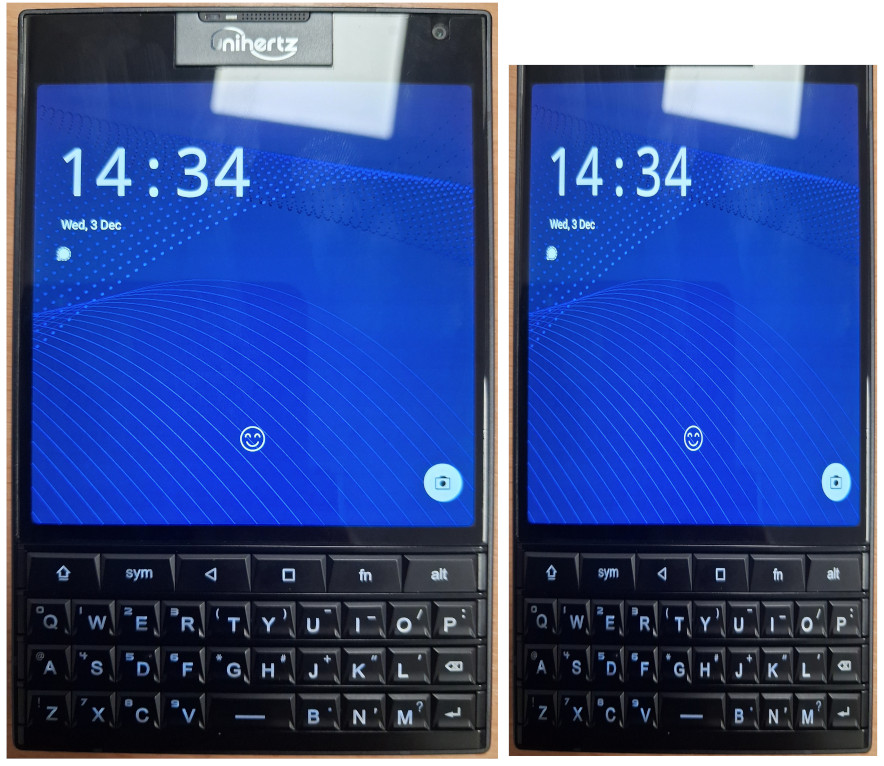
    • First and foremost this device is a really odd size and shape. It’s just not ergonomic. The phone is heavy, has sharp edges, and is extremely wide and thick. The width I understand, they had to incorporate the Blackberry Passport screen, and it’s square so seeing as though they were set on using that display there wasn’t much they could do. On the other hand though I can’t see any excuse for the excessive thickness of this device. The battery is average sized, and aside from the physical keyboard there are no components it has that any other phone doesn’t. I also don’t see a reason for the excess space above the screen. The selfie camera and microphone could’ve been incorporated into a space a quarter of the height. Below (excuse my poor butchery, I’m no graphic designer) I’ve adjusted the size of the Titan 2 to something I’d like to see in the future. I’ve cut the width down by 25% and trimmed down the phones forehead. Unihertz; if you’re reading, please consider something with dimensions like this in the future!
    • The square screen. While it’s good for text based work and reading, it’s not much good for anything else. All of the apps and mobile websites are built assuming the device is a vertical rectangle. Things don’t fit well, and the experience becomes clunky when I have to start using mini mode. On the plus side the quality of the LCD panel is excellent. Clarity is great, brightness too and for a 60Hz refresh rate it feels very smooth.
    • The included case. I appreciate that one was included, just as I appreciate the screen protectors that were pre-applied. It has to be said though that this case is awful. It has sharp edges which make using the phone uncomfortable, and adds enough thickness to the phone to make it unmanageable. I’ve resorted to now using the phone without a case, and having to deal with the constant attempts of the fingerprint reader when I’m handling the phone.
    • The stock launcher. Overall it isn’t terrible, but there are little things missing such as the ability to stop new apps appearing on my home screen, or not being able to make folders in the app drawer.
    • The stock keyboard app. Thankfully I’m using Pastiera now so I don’t have to deal with the “Kika” keyboard, but the on screen element due to the lack of a comprehensive set of physical symbol keys is terribly executed and needs an overhaul. I did not purchase a phone with a physical keyboard to have 1/4 of my screen taken up with the on screen keyboard.
    • The keyboard. This is a joy to type on. The tactility and weight of the keys is perfect. The size and shape of the buttons mean I get no mis typed letters even typing with the soft part of my thumbs. I’ve managed to get typing at a good speed relatively quickly. The top row is a disaster though. A dedicated home key is missing, and the FN key really isn’t sure what it’s supposed to be. I also feel like putting the shift and alt keys on the top row rather than the bottom was a strange choice to make.
    • The cameras. I don’t expect Google Pixel levels of photography from a device like this. However, trying to produce an image that’s even usable on this phones cameras is a challenge. Lighting, colour balance, shutter speed and noise are all dreadful. I haven’t seen cameras this bad since I tried the HMD Pulse for a while.

    I really hope that the huge boom of interest in this phone spurs Unihertz to continue down this path of making qwerty phones. There’s clearly a demand for it. If we do see a “Titan 2 Slim” I’d love to see a lot of what I’ve written above resolved.

    For me I’d be willing to largely ignore the downsides I’ve listed above if only the cameras were better. Having a young Son there are memories that I want to capture happening regularly and I can’t always have my DSLR at the ready.

    This unfortunately meant my SIM card had to come back out of the Titan 2. It will still see regular use in my ownership; I enjoy journaling on this device and organising my life on this device is also a pleasant experience. But it will not get use as my main phone, as much as I wanted it to. The smartphone as we know it is a well established form factor, it’ll take some refinement before a qwerty phone can challenge it.

  • Unihertz Titan 2 – Promising progress and community interest.

    It’s been a couple of months now since us backers of the Titan 2 Kickstarter campaign started to receive our devices. Aside from the disastrous communications during the production and shipping I’m happy to report that the actual phones are proving to be excellent!

    So far we have received 2 OTA updates, which seems to indicate that Unihertz are listening to the community and are being proactive in their approach. Hopefully this enthusiasm continues.

    The first OTA fixed a very serious issue: The majority of devices would experience phantom touch issues with the screen, the phone would detect and respond to touches that didn’t happen, causing all sorts of serious issues for people. Thankfully by the time I’d received my Titan 2 this update had been released, so I didn’t have to experience this issue.

    The second OTA was minor fixes and improvements. It fixed a couple of minor bugs such as the programmable buttons not always responding when the screen was off, and I believe Unihertz have made some improvements to the standard “Kika” keyboard.

    More encouraging is the community that is forming around this phone. Already we have a very early release of LineageOS for this device, which can be found here: GitHub – agreenbhm/Unihertz-Titan-2-LineageOS. Unfortunately on this one it doesn’t look like any updates have been made since its initial release, but it may prove to be a good foundation for someone else to build on.

    There has also been a keyboard app, developed especially for the Titan 2 released called “Pastiera”. Since its initial release I’ve been using this over Kika. It was better than Kika in its first version, and it’s since had a couple of updates which have improved it even more. I highly recommend trying this is you have a Titan 2, it can be found here: Releases · palsoftware/pastiera.

    While I don’t currently have a SIM card in my Titan 2, if we start seeing good results from GCam ports to the level usable photos can be produced that may change. The only thing keeping me from daily driving this device is the lacklustre camera.

    Overall though I’m very glad I made the decision to keep my Titan 2, it’s been a fun experience already and I’m excited to see how this device grows with future updates and community engagement. Long may it continue!

  • The Samsung Note 9 Saga – continued – again.

    I recently wrote about how I’d purchased a used Samsung Note 9, mainly for nostalgic reasons as I’d held the device very fondly in memory ever since owning it. Also that the device had been mis-sold to me as a “SM-N960F” when it was actually a “SM-N960N” (South Korean version).

    Initially I didn’t think this was going to be too much of an issue to me, because all the custom ROM’s I’d seen supported both the F and the N variant, I assumed them to be the same with only software differences. It turns out I was wrong.

    While I was able to get custom ROM’s installed on the phone, I never had good signal. One bar in my home for example, and yet the same SIM in a Pixel 6 in the exact same location would show full signal. Nothing would load over mobile data, if I didn’t have WiFi I couldn’t make calls. Some of the ROM’s I tried to were unable to make calls or send SMS messages at all.

    I then tried the Korean official firmware. This could make calls and texts, but had bizarre restrictions imposed on it, and still had the same signal issue I was having with the custom ROM’s. I had all but given up on the device, and installed a tweaked standard ROM that allowed the selection of any CSC in its setup process, and resigned to using it on Wi-Fi only just to play around with.

    Persistence is an annoying quality of mine, sometimes a blessing, sometimes a curse and this time I wasn’t willing to give up. I had a Note 9 in beautiful condition with a fresh battery, no screen burn, freshly outfitted with an old stock official Samsung case and a perfectly applied UV screen protector. I wanted to use it! So off to eBay I went. This time I was searching for “spares or repairs” devices, but specifically the F version of the phone.

    Eventually I found one for a price I was willing to pay. It was sold as heavily used with a screen fault, but I’d confirmed with the seller that it could power on, and had been factory reset with the Google account removed. The seller was only about 10 miles away but I opted for shipping out of convenience. It somehow took over a week to arrive!

    When it did arrive I was amazed at just how much this device had been used. It must’ve been in daily use since release. The colour of the fingerprint scanner had worn off, the aluminium frame had worn down with deep pitting. The back glass was shattered and there were some cracks on the screen. Importantly though, it worked and it was a UK model! On disassembly I did notice a small amount of water damage corrosion on the pogo pins, perhaps this was what caused the screen to go off. Thankfully this hadn’t progressed too much and was cleaned off with some alcohol and a cotton bud. Out with the motherboard! By this point I’ve been in and out of these devices so much that it took me about 10 minutes from receiving the phone to having the board out.

    On disassembly of my recipient phone I broke the back glass (again!), so ordered a genuine used part that just needed the camera glass replacing for a couple of pounds. If I ever have to open this phone up again I’ll probably just order back glass pre-emptively. Out with the Korean motherboard and in with the UK one! At this point I was uncertain whether this conversion would work. I could find nothing about this online, but after seeing the 2 motherboards side by side I was fairly confident. All the connectors are identical, and there were only a couple of differences from what I could see on the boards. Thankfully I was correct and the phone booted up.

    Thankfully because Samsung aren’t Apple (yet!) parts aren’t serialized, so I had no problems using all the other components including the Iris scanner and fingerprint scanner from the Korean phone, as they were in much nicer condition than the UK donor. After patiently waiting for the back glass adhesive to dry I now have a near mint condition Samsung Note 9, with proper signal and that runs on official UK BTU firmware!

    I feel like this is where I went wrong with my initial revisit. I was using custom ROM’s. Part of my good memories about this phone weren’t from just the hardware but the software. It is ram packed with functionality. From the air features of the S-Pen, to the iris scanner and the blood oxygen sensor this phone is just excessive, in a good way. When you use a custom ROM with this device you lose all that, generally they’re ports from other devices so you just get standard functionality. This phone even has an adjustable aperture main camera, that I haven’t seen function on anything other than the official camera app.

    Now obviously this is less than ideal, because the last update this phone received was on Android 10 and has a security patch date of some point in 2022. To mitigate this I’ve rooted the device, removed a lot of the bloatware and all of the Google services, I’ve also got a root firewall running to control what data comes into and leaves the phone. If I were using mobile banking on this device or holding sensitive data I’d probably think twice about having my SIM in a Android 10 device, but I’m not! Thankfully all my required apps are still supported and with 6GB RAM this device breezes through everything I throw at it.

    This device; now my daily driver is an ode to Android longevity, even in lieu of updates. The iPhone X and 8 that this device competed with, whilst receiving many more years of updates are now mostly obsolete because Apple have much stricter controls over what versions of iOS developers can publish apps for. Once updates for an iPhone stop app, compatibility falls off a cliff fast. Most Android apps on the other hand (for now at least) seem to have fairly lax requirements. Android 7 or 8 seems to be the common requirement, so if this moves up 1 version per year the Note 9 could still function for another couple of years without too much difficulty, taking it to nearly a decade old!

  • Unihertz Titan 2 Review

    Being a post about the Titan 2 I thought it would be fitting to compose this post entirely using the Titan 2! This, and the fact my delivery from Unihertz was delayed are the main reason I haven’t posted earlier.

    Using the physical keyboard on this phone has been a leaning curve I really wasn’t expecting to be so steep. My typing speed is still much slower than I am on a touch screen phone however it is improving. I’ve also found that because I’m having to put so much concentration into the typing itself the quality of my writing is taking a hit. Bear with me on this one!

    Starting at the beginning with the Kickstarter campaign; it wasn’t a smooth process. Updates were sporadic at best, and for whatever reason Unihertz didn’t capture shipping addresses through Kickstarter so they had to send out a survey to provide these details. Mine, and several thousand other backers then ended up on a “bad address” list which I suspect delayed my parcel. I never did get to the bottom of what was bad about my address as when I queried it my number was removed from the naughty list without a response. Nevertheless I received mine on the 10th of November.

    The unboxing experience of the phone was surprisingly comprehensive. The phone came with a rubber case, a UK charging brick, a USB-C cable, a pre applied front and rear screen protector and a spare front screen protector. If only other brands included all that in their boxes!

    Onto the Titan 2; my initial impressions were largely directed towards the form factor. I never owned or held an original Blackberry Passport so aside from a few videos I’d watched I didn’t know what to expect. The shape of this device is truly unlike anything else available on the market today. It’s shorter than most other phones, but considerably wider and thicker. If you’re a man it’ll just about fit in your front pants pocket but the bulge looks fairly ridiculous, I’ve resorted to carrying this in my back pocket which I’ve never done with a phone before.

    The whole design is radically different to the glass rectangles we’ve grown accustomed to over the last decade or so. Obviously we’re got a full physical keyboard but the square screen is out of the ordinary too. Then there’s the “subscreen” on the back amongst the cameras. I’ve not got an awful lot to say about this, it displays the clock and a couple of widgets. I’ve barely used it.

    My use case is a little different to the norm in that I root and “degoogle” my devices, so for me that was the first order of service. Thankfully it’s all doable on the Titan 2 and Unihertz don’t include a lot of bloatware on their devices so the whole process didn’t take too long.

    Testament to the device, aside from typing, using the phone is basically indistinguishable from any other mid range Android phone. It’s fast, has plenty of storage and the display is bright and clear. The battery seems to last a really long time and the OS is well optimised, to the point where most nights I’ll wake up to the device being on the same battery percentage as when I went to bed. Surprisingly the screen has caused me zero issues. I had thoughts that my apps wouldn’t fit on the screen or things would look awkward but that just hasn’t been the case. In fact, in my usage at least, it’s been quite the opposite. Websites look better with more horizontal space and things just feel roomier. More text fits on a line and the experience feels a bit more akin to using a desktop. On paper a 4.5″ screen sounds tiny, but in a square form it feels a lot bigger, especially when typing as none of that screen real estate is being taken up by an on screen keyboard.

    Leading us onto the star of the show, the keyboard. Admittedly my only other experience of a qwerty keyboard on a phone was with a Samsung chat 335, so I’m no die hard qwerty phone fanatic by any means. However I do spend a lot of time typing on phsical keyboards in and out of work so hopefully that gives me the credentials to weigh in on it.
    Before I say anything negative about it I’d also like to say overall I’m just glad that this phone exists. It’s not like we have many other options in 2025.

    Overall the keyboard is good. Typing feels great, with the perfect amount of resistance and bounce back to the keys so that the tactile experience is a joy. The size of the keys is good too, even for me with big thumbs. The layout however could’ve used more thought, and probably an extra row. Excluding the F key row, on a full sized keyboard you have 5 rows, and this phone is making do with barely 4. Half of the top row on the Titan 2 is dedicated to navigation, with only 3 being used as typing modifiers. To be honest I’ve got used to having the shift and alt keys at the top quicker than I thought I would, however having the space bar amongst the bottom row of letters was a terrible idea. It throws all muscle memory out of the window, combine this with the fact the key are in an inline formation rather than the standard offset means that the learning curve of typing on this device is fairly brutal. That being said, persist and you will get used to it and over time typing slowly starts to become enjoyable on this device and less like a chore.

    My second gripe over this keyboard is the software “kika” keyboard. In lieu of a comprehensive set of symbol keys Uniherz have given us a sym key which triggers an on screen set of less frequently used characters to choose from. I don’t actually have a problem with this, but in order to do this you need to have the onscreen keyboard option enabled in settings. When you do this you end up with a bar that takes up around 1/5 of the screen for a spellchecker and a row of symbols that actually have a physical alternative so are completely pointless. I really hope this is improved upon in a future update. I’ve tried a myriad of alternative keyboards but unfortunately none work with this particular physical keyboard very well.

    UPDATE: A dev and member of the unihertz community has released an open source keyboard developed for the Titan 2. It can be found here: https://github.com/palsoftware/pastiera/releases. It’s in it’s early beta phase, but so far I’m finding it handles the on screen element of the keyboard much better than “kika”.

    From the ground up this device is very well suited to being a productivity device rather than one for media creation/consumption. Having a square screen helps with text, and gives you a lot of usable space but renders video in a tiny postbox. You really wouldn’t want to be watching Youtube or Netflix on that device, even though it can be done in a pinch.

    The Titan 2 is a device you have to persist with to give it a fair chance. If I’d have used this for an hour and formed my opinion on it based solely on that I’d have probably put it back in the box and resold it. However if you persist, get through the learning curve and learn to work around some of the phones quirks and limitations you’re left with something quite special. I can almost guarantee I’ll never bump into another person with this device, and while it offers no real technical advantage over any other smartphone it is a really satisfying phone to use. Do I need a physical keyboard? No, definitely not. But it’s nice to have one, and variety in such a bland market can only be a good thing.

  • Digital everything – The generation left behind

    “Install our app to access this feature”

    “Scan the QR code to view our menu”

    “It’s much easier if you’d just download our app and do it on there”

    These are all phrases that 15-20 years ago would’ve been met with confusion, and yet in a short space of time this has become our “new normal”.

    I am a shameless tech enthusiast and a career IT guy, but my level of tech participation is probably akin to a 70 year old. Heck, even my 76 year old Grandfather uses mobile banking. There are multiple reasons why I refuse to install apps for businesses, and rely on the older ways but one of them is to try and support the older generations.

    There is a wide range of people, ranging from as low as around 55 all the way up to however the oldest person currently is that have been left behind by societies rapid changes. Changes that were rushed in as a result of the Covid 19 ordeal, and kept around after because it turned out to be cheaper.

    These people may just never have taken an interest in technology, maybe they’re scared of it because of all the news coverage of cybercrime, maybe they can’t afford it, or maybe they have a disability that makes it difficult for them to use. For the majority of their adult lives these people have been able to get by without issue.

    They pay with cash, cheque, card or over the phone. They go to the bank to pay bills, withdraw and send money and check their balances. When they need to travel somewhere new they look in the map for directions. They read newspapers or watch the news on TV. They keep in contact with family and friends over phone call or just in person, when they’re on holiday they send postcards. They do all of their shopping in person, or at a push through a catalogue.

    Some people today; the “digital minimalists” are striving for this kind of life, but for these people it’s just their default. And you know what, I don’t blame them one bit. For us Millennials this technology started to come out while we were young, so it was exciting for us. For Gen-Z people it’s just always been there. But for anyone older they were adults already when this stuff started happening. Of course some of them learnt and embraced it, but for others they were happy with the way their lives worked, why change that?

    I used to think these people were just old and lazy but as I grow older myself I’ve begun to understand and sympathise with their situation. I have a similar sentiment to AI. I lived all this time without it successfully, why would I need it now? After all, I’ve been able to learn whatever I’ve wanted, and I’ve managed my whole life thus far without a personal assistant just fine.

    Anyway I’m drifting away from my original topic (surprise). There is a growing number of people around the world that if something isn’t done risk being unable to access services. This is a bit of a crude comparison but we make accommodations for disabled people to ensure they can access things, such as ramps for wheelchair users or braille for blind people, why are we not making sure that people can do things regardless of whether or not they have a smartphone in their pocket?

    Those of us who are able and have an understanding of technology embraced it because of its convenience, never stopping to give a second thought to the consequences. Nearly all the banks have closed down now in favour of app based banking, think of the knock on effects just from this: The town centres that lose the business from people not bothering to go, as the main purpose of their trip would be to use the bank. The bank tellers, cleaners, and various other workers that lost their jobs from the closure. Finally the people that now have to travel miles to access wherever the nearest remaining bank is, because they don’t have access to the app.

    Think of the old couple that went out to a new restaurant that opened, only to find out they have no way of seeing the menu, and no way of paying because the restaurant is “cashless”.

    Think of the socially isolated person whose world just got even quieter, because the interaction they used to get when accessing their services has now been replaced with an app.

    Give some thought how behaviour has changed since Covid. People are less empathetic, more aggressive, much more self centred and are less likely to say hello in the street. Humans are social creatures, we haven’t evolved (or been designed, depending on what you believe) to conduct business with computer programs. Whether you like it or not it is having a negative effect on us.

    So yes, I refuse all of this. I refuse to use any form of AI assistant, or chat bot. I don’t use mobile apps in favour of a website or an in person option. I won’t be using a digital ID if that comes about. I don’t use any form of social media, instead I make phone calls or meet with people in person. I don’t play any online games, and have never bought a “DLC” in my life. I get my photos printed out and keep them in a photo album. I buy my clothes in brick and mortar shops. My motorcycle doesn’t even have a rev counter, let alone Android Auto. I don’t have a Google account, and there are no Google services on my phone.

    Now obviously I’m not doing all those things I mentioned above to help others that can’t use digital services, because some of them are completely irrelevant to that cause. No, I do them for a couple of reasons. One; I don’t like having things forced on me, especially when there’s no benefit to me. So in a way it’s a push back, or an act of rebellion. I choose to live my life without them because someone tried to convince me I needed it. Two; I’ve been in the tech space long enough to know that if something is free at the point of use, you’re the product. Some people are fine with it, but personally, just knowing that data is being collected on me and I’m being profiled while just going about my daily life creeps me out. I avoid generating personal data wherever I can.

    Next time you’re asked to download an app, or scan a QR code, maybe just take a moment to think, do you really need this? Or is there an alternative? Just because something seems like the most convenient option doesn’t mean it’s the best, especially not in the long run. Give some thought to your fellow humans, who might be in the process of being replaced with an app, or an AI chatbot. Who knows, if we keep accepting it, it could be us next.