Category: Tech

  • Thinned the herd… Again!

    My tech drawer was getting full again, the burden of too many phones beginning to weight down on me. It was time for a clear out. The inventory stood at:

    • Unihertz Titan 2
    • Samsung Note 9
    • Samsung S25 FE
    • Pixel 6
    • 2x Pixel 7a
    • Pixel 2 XL

    I’ll never sell the Note 9 now I have it, even if it’s not suitable for daily use because of the poor signal. So that was always staying. The Pixel 2 XL is beyond economical repair, and has no real value so that was staying. The rest were all eligible for eviction.

    I’ve been trying to justify owning the Titan 2 since it arrived. I wanted it to be my main phone badly, it just didn’t really fit. I then tried to keep it as a PDA type device, but it just wasn’t seeing any use. That was first to go, thankfully hype for this device is still high so it didn’t take long at all to sell.

    2nd was one of the Pixel 7a’s. I certainly don’t need multiple of the same device, so this was next to go. I actually turned a small profit on this one as I bought it with a swollen battery, and I just so happed to have a spare battery so a quick and easy repair.

    Next, surprisingly was the S25 FE. On paper this was my long term phone that could see me through 7 years until it stopped getting updates. In real world usage this didn’t play out. It’s a brilliant phone in all areas except one. The cameras. I loved its build quality, the screen, battery life, performance and features but cameras have and always will be a deciding factor for me as much as I like to deny that. When this phone was being put to shame by photos produced by the Pixel 6; a device 4 years senior to the S25 FE it was in the firing line. Thankfully as I’d purchased this phone on a promotion I didn’t lose any money reselling this.

    I’m not going to even consider the Note 9 and 2XL in my phones as neither are really functional phones to be considered, rather just a memento and a tool for testing purposes. So that leaves me with a Pixel 6 and a Pixel 7a.

    From my research the Pixel 6 will be supported with software and security updates until October 2026. The Pixel 7a will be supported until May 2028. From my usage the difference in performance is unnoticeable between the two devices, the Pixel 7a is marginally smaller than the 6 however the camera on the Pixel 6 seems much better out of the two phones.

    For now I’ll use the Pixel 6. I repaired it when I got it with a new battery and genuine screen, so aside from the housing being worn (doesn’t matter the phone lives in a case) it’s like using a brand new device. It’s unfortunate that this phone will only received updates for another 10 months, because it feels like it has a lot more life left in it. Comparing the camera specs to the Pixel 9 they’re essentially the same, and if I compare it to the Pixel 10 the Pixel 6 actually comes out on top in terms of camera hardware! Even the Pixel 7a beats the camera of the Pixel 10 which has downgraded to a measly half inch sensor.

    It’s sad to see Google nerfing the quality of their hardware in favour of using AI to supplement a decent sensor. The Pixel 9a shares the same sensor as the 10. So it seems my options from here would be either a Pixel 8 or a Pixel 9 in either the standard, Pro or Pro XL variants.

    My reasoning behind this, and my reason for bypassing any of the Pixel 7 series are that from the 8 onwards Google started offering 7 years of software support. A pixel 8 would still have another 5 years of updates, and a 9 would have 6.

  • Unihertz Titan 2 – A more critical view

    Sometimes it’s hard to get a real impression of a product until you use it properly. I think that’s why when we read or watch reviews online they often completely miss issues that the majority of actual users will experience. In the case of phones until you use a phone as your actual phone, and not just an accessory or a device to tinker with. I mean actually using and relying on it as a primary communication device, no other phone as backup with your SIM card in.

    Up until the past few days I’ve never solely used the Titan 2. To be honest I never bought it as a device to replace my phone, I just thought it was a cool device and wanted to back the Kickstarter campaign to ensure a new qwerty phone came to the market. However, after enjoying the phone in my usage and really enjoying the physical keyboard I wanted to try using it as my actual phone. Here’s what I observed:

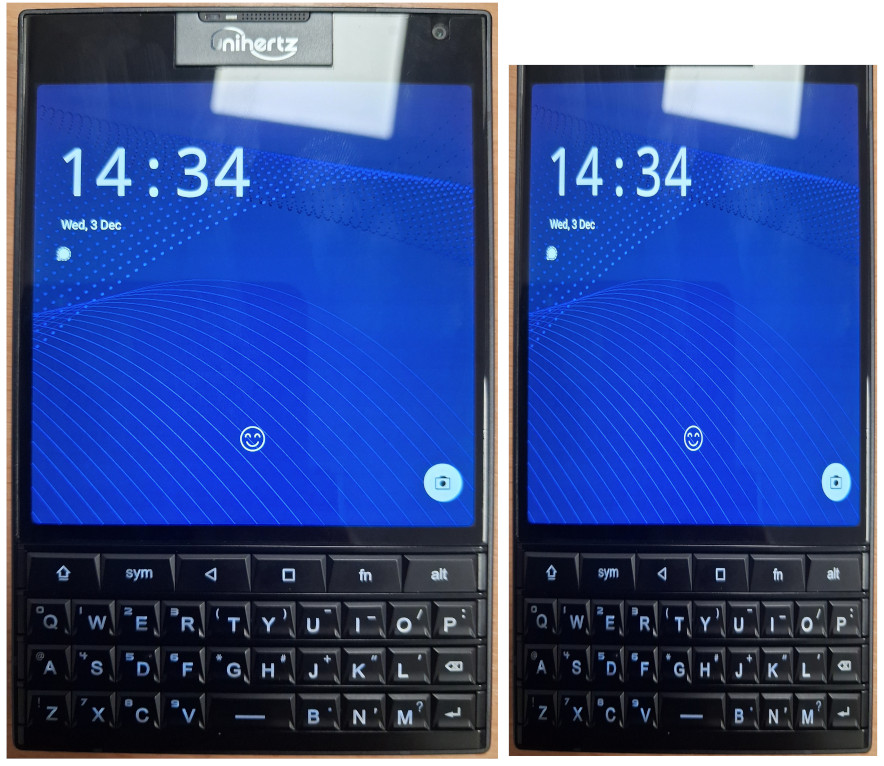
    • First and foremost this device is a really odd size and shape. It’s just not ergonomic. The phone is heavy, has sharp edges, and is extremely wide and thick. The width I understand, they had to incorporate the Blackberry Passport screen, and it’s square so seeing as though they were set on using that display there wasn’t much they could do. On the other hand though I can’t see any excuse for the excessive thickness of this device. The battery is average sized, and aside from the physical keyboard there are no components it has that any other phone doesn’t. I also don’t see a reason for the excess space above the screen. The selfie camera and microphone could’ve been incorporated into a space a quarter of the height. Below (excuse my poor butchery, I’m no graphic designer) I’ve adjusted the size of the Titan 2 to something I’d like to see in the future. I’ve cut the width down by 25% and trimmed down the phones forehead. Unihertz; if you’re reading, please consider something with dimensions like this in the future!
    • The square screen. While it’s good for text based work and reading, it’s not much good for anything else. All of the apps and mobile websites are built assuming the device is a vertical rectangle. Things don’t fit well, and the experience becomes clunky when I have to start using mini mode. On the plus side the quality of the LCD panel is excellent. Clarity is great, brightness too and for a 60Hz refresh rate it feels very smooth.
    • The included case. I appreciate that one was included, just as I appreciate the screen protectors that were pre-applied. It has to be said though that this case is awful. It has sharp edges which make using the phone uncomfortable, and adds enough thickness to the phone to make it unmanageable. I’ve resorted to now using the phone without a case, and having to deal with the constant attempts of the fingerprint reader when I’m handling the phone.
    • The stock launcher. Overall it isn’t terrible, but there are little things missing such as the ability to stop new apps appearing on my home screen, or not being able to make folders in the app drawer.
    • The stock keyboard app. Thankfully I’m using Pastiera now so I don’t have to deal with the “Kika” keyboard, but the on screen element due to the lack of a comprehensive set of physical symbol keys is terribly executed and needs an overhaul. I did not purchase a phone with a physical keyboard to have 1/4 of my screen taken up with the on screen keyboard.
    • The keyboard. This is a joy to type on. The tactility and weight of the keys is perfect. The size and shape of the buttons mean I get no mis typed letters even typing with the soft part of my thumbs. I’ve managed to get typing at a good speed relatively quickly. The top row is a disaster though. A dedicated home key is missing, and the FN key really isn’t sure what it’s supposed to be. I also feel like putting the shift and alt keys on the top row rather than the bottom was a strange choice to make.
    • The cameras. I don’t expect Google Pixel levels of photography from a device like this. However, trying to produce an image that’s even usable on this phones cameras is a challenge. Lighting, colour balance, shutter speed and noise are all dreadful. I haven’t seen cameras this bad since I tried the HMD Pulse for a while.

    I really hope that the huge boom of interest in this phone spurs Unihertz to continue down this path of making qwerty phones. There’s clearly a demand for it. If we do see a “Titan 2 Slim” I’d love to see a lot of what I’ve written above resolved.

    For me I’d be willing to largely ignore the downsides I’ve listed above if only the cameras were better. Having a young Son there are memories that I want to capture happening regularly and I can’t always have my DSLR at the ready.

    This unfortunately meant my SIM card had to come back out of the Titan 2. It will still see regular use in my ownership; I enjoy journaling on this device and organising my life on this device is also a pleasant experience. But it will not get use as my main phone, as much as I wanted it to. The smartphone as we know it is a well established form factor, it’ll take some refinement before a qwerty phone can challenge it.

  • Unihertz Titan 2 – Promising progress and community interest.

    It’s been a couple of months now since us backers of the Titan 2 Kickstarter campaign started to receive our devices. Aside from the disastrous communications during the production and shipping I’m happy to report that the actual phones are proving to be excellent!

    So far we have received 2 OTA updates, which seems to indicate that Unihertz are listening to the community and are being proactive in their approach. Hopefully this enthusiasm continues.

    The first OTA fixed a very serious issue: The majority of devices would experience phantom touch issues with the screen, the phone would detect and respond to touches that didn’t happen, causing all sorts of serious issues for people. Thankfully by the time I’d received my Titan 2 this update had been released, so I didn’t have to experience this issue.

    The second OTA was minor fixes and improvements. It fixed a couple of minor bugs such as the programmable buttons not always responding when the screen was off, and I believe Unihertz have made some improvements to the standard “Kika” keyboard.

    More encouraging is the community that is forming around this phone. Already we have a very early release of LineageOS for this device, which can be found here: GitHub – agreenbhm/Unihertz-Titan-2-LineageOS. Unfortunately on this one it doesn’t look like any updates have been made since its initial release, but it may prove to be a good foundation for someone else to build on.

    There has also been a keyboard app, developed especially for the Titan 2 released called “Pastiera”. Since its initial release I’ve been using this over Kika. It was better than Kika in its first version, and it’s since had a couple of updates which have improved it even more. I highly recommend trying this is you have a Titan 2, it can be found here: Releases · palsoftware/pastiera.

    While I don’t currently have a SIM card in my Titan 2, if we start seeing good results from GCam ports to the level usable photos can be produced that may change. The only thing keeping me from daily driving this device is the lacklustre camera.

    Overall though I’m very glad I made the decision to keep my Titan 2, it’s been a fun experience already and I’m excited to see how this device grows with future updates and community engagement. Long may it continue!

  • The Samsung Note 9 Saga – continued – again.

    I recently wrote about how I’d purchased a used Samsung Note 9, mainly for nostalgic reasons as I’d held the device very fondly in memory ever since owning it. Also that the device had been mis-sold to me as a “SM-N960F” when it was actually a “SM-N960N” (South Korean version).

    Initially I didn’t think this was going to be too much of an issue to me, because all the custom ROM’s I’d seen supported both the F and the N variant, I assumed them to be the same with only software differences. It turns out I was wrong.

    While I was able to get custom ROM’s installed on the phone, I never had good signal. One bar in my home for example, and yet the same SIM in a Pixel 6 in the exact same location would show full signal. Nothing would load over mobile data, if I didn’t have WiFi I couldn’t make calls. Some of the ROM’s I tried to were unable to make calls or send SMS messages at all.

    I then tried the Korean official firmware. This could make calls and texts, but had bizarre restrictions imposed on it, and still had the same signal issue I was having with the custom ROM’s. I had all but given up on the device, and installed a tweaked standard ROM that allowed the selection of any CSC in its setup process, and resigned to using it on Wi-Fi only just to play around with.

    Persistence is an annoying quality of mine, sometimes a blessing, sometimes a curse and this time I wasn’t willing to give up. I had a Note 9 in beautiful condition with a fresh battery, no screen burn, freshly outfitted with an old stock official Samsung case and a perfectly applied UV screen protector. I wanted to use it! So off to eBay I went. This time I was searching for “spares or repairs” devices, but specifically the F version of the phone.

    Eventually I found one for a price I was willing to pay. It was sold as heavily used with a screen fault, but I’d confirmed with the seller that it could power on, and had been factory reset with the Google account removed. The seller was only about 10 miles away but I opted for shipping out of convenience. It somehow took over a week to arrive!

    When it did arrive I was amazed at just how much this device had been used. It must’ve been in daily use since release. The colour of the fingerprint scanner had worn off, the aluminium frame had worn down with deep pitting. The back glass was shattered and there were some cracks on the screen. Importantly though, it worked and it was a UK model! On disassembly I did notice a small amount of water damage corrosion on the pogo pins, perhaps this was what caused the screen to go off. Thankfully this hadn’t progressed too much and was cleaned off with some alcohol and a cotton bud. Out with the motherboard! By this point I’ve been in and out of these devices so much that it took me about 10 minutes from receiving the phone to having the board out.

    On disassembly of my recipient phone I broke the back glass (again!), so ordered a genuine used part that just needed the camera glass replacing for a couple of pounds. If I ever have to open this phone up again I’ll probably just order back glass pre-emptively. Out with the Korean motherboard and in with the UK one! At this point I was uncertain whether this conversion would work. I could find nothing about this online, but after seeing the 2 motherboards side by side I was fairly confident. All the connectors are identical, and there were only a couple of differences from what I could see on the boards. Thankfully I was correct and the phone booted up.

    Thankfully because Samsung aren’t Apple (yet!) parts aren’t serialized, so I had no problems using all the other components including the Iris scanner and fingerprint scanner from the Korean phone, as they were in much nicer condition than the UK donor. After patiently waiting for the back glass adhesive to dry I now have a near mint condition Samsung Note 9, with proper signal and that runs on official UK BTU firmware!

    I feel like this is where I went wrong with my initial revisit. I was using custom ROM’s. Part of my good memories about this phone weren’t from just the hardware but the software. It is ram packed with functionality. From the air features of the S-Pen, to the iris scanner and the blood oxygen sensor this phone is just excessive, in a good way. When you use a custom ROM with this device you lose all that, generally they’re ports from other devices so you just get standard functionality. This phone even has an adjustable aperture main camera, that I haven’t seen function on anything other than the official camera app.

    Now obviously this is less than ideal, because the last update this phone received was on Android 10 and has a security patch date of some point in 2022. To mitigate this I’ve rooted the device, removed a lot of the bloatware and all of the Google services, I’ve also got a root firewall running to control what data comes into and leaves the phone. If I were using mobile banking on this device or holding sensitive data I’d probably think twice about having my SIM in a Android 10 device, but I’m not! Thankfully all my required apps are still supported and with 6GB RAM this device breezes through everything I throw at it.

    This device; now my daily driver is an ode to Android longevity, even in lieu of updates. The iPhone X and 8 that this device competed with, whilst receiving many more years of updates are now mostly obsolete because Apple have much stricter controls over what versions of iOS developers can publish apps for. Once updates for an iPhone stop app, compatibility falls off a cliff fast. Most Android apps on the other hand (for now at least) seem to have fairly lax requirements. Android 7 or 8 seems to be the common requirement, so if this moves up 1 version per year the Note 9 could still function for another couple of years without too much difficulty, taking it to nearly a decade old!

  • Unihertz Titan 2 Review

    Being a post about the Titan 2 I thought it would be fitting to compose this post entirely using the Titan 2! This, and the fact my delivery from Unihertz was delayed are the main reason I haven’t posted earlier.

    Using the physical keyboard on this phone has been a leaning curve I really wasn’t expecting to be so steep. My typing speed is still much slower than I am on a touch screen phone however it is improving. I’ve also found that because I’m having to put so much concentration into the typing itself the quality of my writing is taking a hit. Bear with me on this one!

    Starting at the beginning with the Kickstarter campaign; it wasn’t a smooth process. Updates were sporadic at best, and for whatever reason Unihertz didn’t capture shipping addresses through Kickstarter so they had to send out a survey to provide these details. Mine, and several thousand other backers then ended up on a “bad address” list which I suspect delayed my parcel. I never did get to the bottom of what was bad about my address as when I queried it my number was removed from the naughty list without a response. Nevertheless I received mine on the 10th of November.

    The unboxing experience of the phone was surprisingly comprehensive. The phone came with a rubber case, a UK charging brick, a USB-C cable, a pre applied front and rear screen protector and a spare front screen protector. If only other brands included all that in their boxes!

    Onto the Titan 2; my initial impressions were largely directed towards the form factor. I never owned or held an original Blackberry Passport so aside from a few videos I’d watched I didn’t know what to expect. The shape of this device is truly unlike anything else available on the market today. It’s shorter than most other phones, but considerably wider and thicker. If you’re a man it’ll just about fit in your front pants pocket but the bulge looks fairly ridiculous, I’ve resorted to carrying this in my back pocket which I’ve never done with a phone before.

    The whole design is radically different to the glass rectangles we’ve grown accustomed to over the last decade or so. Obviously we’re got a full physical keyboard but the square screen is out of the ordinary too. Then there’s the “subscreen” on the back amongst the cameras. I’ve not got an awful lot to say about this, it displays the clock and a couple of widgets. I’ve barely used it.

    My use case is a little different to the norm in that I root and “degoogle” my devices, so for me that was the first order of service. Thankfully it’s all doable on the Titan 2 and Unihertz don’t include a lot of bloatware on their devices so the whole process didn’t take too long.

    Testament to the device, aside from typing, using the phone is basically indistinguishable from any other mid range Android phone. It’s fast, has plenty of storage and the display is bright and clear. The battery seems to last a really long time and the OS is well optimised, to the point where most nights I’ll wake up to the device being on the same battery percentage as when I went to bed. Surprisingly the screen has caused me zero issues. I had thoughts that my apps wouldn’t fit on the screen or things would look awkward but that just hasn’t been the case. In fact, in my usage at least, it’s been quite the opposite. Websites look better with more horizontal space and things just feel roomier. More text fits on a line and the experience feels a bit more akin to using a desktop. On paper a 4.5″ screen sounds tiny, but in a square form it feels a lot bigger, especially when typing as none of that screen real estate is being taken up by an on screen keyboard.

    Leading us onto the star of the show, the keyboard. Admittedly my only other experience of a qwerty keyboard on a phone was with a Samsung chat 335, so I’m no die hard qwerty phone fanatic by any means. However I do spend a lot of time typing on phsical keyboards in and out of work so hopefully that gives me the credentials to weigh in on it.
    Before I say anything negative about it I’d also like to say overall I’m just glad that this phone exists. It’s not like we have many other options in 2025.

    Overall the keyboard is good. Typing feels great, with the perfect amount of resistance and bounce back to the keys so that the tactile experience is a joy. The size of the keys is good too, even for me with big thumbs. The layout however could’ve used more thought, and probably an extra row. Excluding the F key row, on a full sized keyboard you have 5 rows, and this phone is making do with barely 4. Half of the top row on the Titan 2 is dedicated to navigation, with only 3 being used as typing modifiers. To be honest I’ve got used to having the shift and alt keys at the top quicker than I thought I would, however having the space bar amongst the bottom row of letters was a terrible idea. It throws all muscle memory out of the window, combine this with the fact the key are in an inline formation rather than the standard offset means that the learning curve of typing on this device is fairly brutal. That being said, persist and you will get used to it and over time typing slowly starts to become enjoyable on this device and less like a chore.

    My second gripe over this keyboard is the software “kika” keyboard. In lieu of a comprehensive set of symbol keys Uniherz have given us a sym key which triggers an on screen set of less frequently used characters to choose from. I don’t actually have a problem with this, but in order to do this you need to have the onscreen keyboard option enabled in settings. When you do this you end up with a bar that takes up around 1/5 of the screen for a spellchecker and a row of symbols that actually have a physical alternative so are completely pointless. I really hope this is improved upon in a future update. I’ve tried a myriad of alternative keyboards but unfortunately none work with this particular physical keyboard very well.

    UPDATE: A dev and member of the unihertz community has released an open source keyboard developed for the Titan 2. It can be found here: https://github.com/palsoftware/pastiera/releases. It’s in it’s early beta phase, but so far I’m finding it handles the on screen element of the keyboard much better than “kika”.

    From the ground up this device is very well suited to being a productivity device rather than one for media creation/consumption. Having a square screen helps with text, and gives you a lot of usable space but renders video in a tiny postbox. You really wouldn’t want to be watching Youtube or Netflix on that device, even though it can be done in a pinch.

    The Titan 2 is a device you have to persist with to give it a fair chance. If I’d have used this for an hour and formed my opinion on it based solely on that I’d have probably put it back in the box and resold it. However if you persist, get through the learning curve and learn to work around some of the phones quirks and limitations you’re left with something quite special. I can almost guarantee I’ll never bump into another person with this device, and while it offers no real technical advantage over any other smartphone it is a really satisfying phone to use. Do I need a physical keyboard? No, definitely not. But it’s nice to have one, and variety in such a bland market can only be a good thing.
  • Digital everything – The generation left behind

    “Install our app to access this feature”

    “Scan the QR code to view our menu”

    “It’s much easier if you’d just download our app and do it on there”

    These are all phrases that 15-20 years ago would’ve been met with confusion, and yet in a short space of time this has become our “new normal”.

    I am a shameless tech enthusiast and a career IT guy, but my level of tech participation is probably akin to a 70 year old. Heck, even my 76 year old Grandfather uses mobile banking. There are multiple reasons why I refuse to install apps for businesses, and rely on the older ways but one of them is to try and support the older generations.

    There is a wide range of people, ranging from as low as around 55 all the way up to however the oldest person currently is that have been left behind by societies rapid changes. Changes that were rushed in as a result of the Covid 19 ordeal, and kept around after because it turned out to be cheaper.

    These people may just never have taken an interest in technology, maybe they’re scared of it because of all the news coverage of cybercrime, maybe they can’t afford it, or maybe they have a disability that makes it difficult for them to use. For the majority of their adult lives these people have been able to get by without issue.

    They pay with cash, cheque, card or over the phone. They go to the bank to pay bills, withdraw and send money and check their balances. When they need to travel somewhere new they look in the map for directions. They read newspapers or watch the news on TV. They keep in contact with family and friends over phone call or just in person, when they’re on holiday they send postcards. They do all of their shopping in person, or at a push through a catalogue.

    Some people today; the “digital minimalists” are striving for this kind of life, but for these people it’s just their default. And you know what, I don’t blame them one bit. For us Millennials this technology started to come out while we were young, so it was exciting for us. For Gen-Z people it’s just always been there. But for anyone older they were adults already when this stuff started happening. Of course some of them learnt and embraced it, but for others they were happy with the way their lives worked, why change that?

    I used to think these people were just old and lazy but as I grow older myself I’ve begun to understand and sympathise with their situation. I have a similar sentiment to AI. I lived all this time without it successfully, why would I need it now? After all, I’ve been able to learn whatever I’ve wanted, and I’ve managed my whole life thus far without a personal assistant just fine.

    Anyway I’m drifting away from my original topic (surprise). There is a growing number of people around the world that if something isn’t done risk being unable to access services. This is a bit of a crude comparison but we make accommodations for disabled people to ensure they can access things, such as ramps for wheelchair users or braille for blind people, why are we not making sure that people can do things regardless of whether or not they have a smartphone in their pocket?

    Those of us who are able and have an understanding of technology embraced it because of its convenience, never stopping to give a second thought to the consequences. Nearly all the banks have closed down now in favour of app based banking, think of the knock on effects just from this: The town centres that lose the business from people not bothering to go, as the main purpose of their trip would be to use the bank. The bank tellers, cleaners, and various other workers that lost their jobs from the closure. Finally the people that now have to travel miles to access wherever the nearest remaining bank is, because they don’t have access to the app.

    Think of the old couple that went out to a new restaurant that opened, only to find out they have no way of seeing the menu, and no way of paying because the restaurant is “cashless”.

    Think of the socially isolated person whose world just got even quieter, because the interaction they used to get when accessing their services has now been replaced with an app.

    Give some thought how behaviour has changed since Covid. People are less empathetic, more aggressive, much more self centred and are less likely to say hello in the street. Humans are social creatures, we haven’t evolved (or been designed, depending on what you believe) to conduct business with computer programs. Whether you like it or not it is having a negative effect on us.

    So yes, I refuse all of this. I refuse to use any form of AI assistant, or chat bot. I don’t use mobile apps in favour of a website or an in person option. I won’t be using a digital ID if that comes about. I don’t use any form of social media, instead I make phone calls or meet with people in person. I don’t play any online games, and have never bought a “DLC” in my life. I get my photos printed out and keep them in a photo album. I buy my clothes in brick and mortar shops. My motorcycle doesn’t even have a rev counter, let alone Android Auto. I don’t have a Google account, and there are no Google services on my phone.

    Now obviously I’m not doing all those things I mentioned above to help others that can’t use digital services, because some of them are completely irrelevant to that cause. No, I do them for a couple of reasons. One; I don’t like having things forced on me, especially when there’s no benefit to me. So in a way it’s a push back, or an act of rebellion. I choose to live my life without them because someone tried to convince me I needed it. Two; I’ve been in the tech space long enough to know that if something is free at the point of use, you’re the product. Some people are fine with it, but personally, just knowing that data is being collected on me and I’m being profiled while just going about my daily life creeps me out. I avoid generating personal data wherever I can.

    Next time you’re asked to download an app, or scan a QR code, maybe just take a moment to think, do you really need this? Or is there an alternative? Just because something seems like the most convenient option doesn’t mean it’s the best, especially not in the long run. Give some thought to your fellow humans, who might be in the process of being replaced with an app, or an AI chatbot. Who knows, if we keep accepting it, it could be us next.

  • Samsung Note 9 – Revisited

    They say never meet your heroes, and unfortunately I think this might just ring true for this phone.

    I wrote my initial post on the Samsung Note 9 in my phone history series. I owned the device back in 2018 for about a year and a half, and have held the device in extremely high regard ever since. I considered it to be the perfect phone, with all the features and high quality before the smartphone manufacturers started cutting features in favour of maximizing profit margins by minimising costs.

    For a while I’d been keeping my eye on the online marketplaces and when I found a Note 9 in excellent condition for less than £100 I made the purchase.

    Unfortunately the seller had been disingenuous and rather than a SM-N960F as advertised he sent a SM-N960N which is a south korean variant. He had made a half baked attempt at flashing UK firmware on it and hoped a buyer wouldn’t notice.

    Fortunately for him I wasn’t planning on running the original ROM anyway as Android 10 is getting long in the tooth now and apps are beginning to drop support. I promptly installed the latest official Lineage ROM released for this device which was version 20 (Android 13). I could take it further up to Android 15 and One UI 7, but I think there will be too many things not working and I don’t want to push the hardware beyond its limits.

    I think a testament to the phone is that it still holds up well 7 years later. The screen is vivid and has a higher resolution than many new phones today. The build quality still feels excellent and the device feels much better in the hand than many new devices today. That’s about all I have for the positives though.

    Unfortunately the years have not been particularly kind to this particular device. Despite its lack of any physical damage the battery is woefully short lived, and the screen has begun to de-bond from the frame. Thankfully I anticipated the battery, and ordered a replacement (and a new back glass just in case!) at the same time I ordered the phone. The screen will need to be removed from the frame, cleaned and have new adhesive applied. Not the end of the world, but not something you’d be dealing with owning a more recent device.

    I have a dislike for curved screens, it feels like wasted space and the side of my hand makes false presses on the screen. Not only this but finding suitable screen protectors for these devices is a nightmare, and generally the only suitable options are glass with UV glue, or TPU film protectors. The Samsung Note 9 has an extremely strong curve on its edges, which its only benefit is making it more comfortable in the hand.

    The Note 9 just doesn’t feel all that special anymore in 2025. It’s still everything that it was back when it was released, but in 2018 this was so much better than other devices on the market. Coming from an iPhone 6s this felt like alien technology. Now it just feels like any other phone. The Micro SD slot is a welcome addition, but a phone with 512GB of onboard storage solves that problem for me. Onto the revered headphone jack. Audiophiles still lust after devices with this illusive port, and even in my eyes the more ports the merrier, but I think it’s just time to admit I don’t need it. All my audio devices are bluetooth, including my car, and while I like music I’m not into it to the degree that I’d notice or appreciate the slight boost in quality from using the jack.

    In some ways I’m sad that this device didn’t live up to my nostalgic memories of it, although I shouldn’t be surprised because things rarely do. On the other hand I’m glad I can finally put this thought to bed, that phones have got progressively worse since this phone released. They haven’t, they’ve got much better, it’s just a much more level playing field between brands that nothing really stands out as special anymore.

  • How Google tightening the leash has pushed me down a different path

    I’ve made a couple of posts now about Google and other OEM’s desperate attempts to lock down the Android operating system into their own version of iOS. Things like “Play integrity”, “Knox counters”, no bootloader unlocks, root detection, keeping development private, all with no tangible benefit to the end user other than preventing us from truly owning our devices.

    The S25 FE that I currently have, after being given an offer from my network I couldn’t refuse is a technically excellent phone, especially for the price I paid, however there’s a but. This phone launched with One UI 8. Samsung quietly decided to remove the ability to unlock the bootloader on every device running One UI 8. Being that this phone launched on this version, there is no option to downgrade. This phone may as well be an iPhone, in that I have zero options to install ROM’s, it will be impossible to obtain root access and if it somehow ends up bricked I will be out of luck.

    If you currently have a Samsung device that is on a One UI version less than 8 I urge you not to update!

    Without root access I have only been able to do so much with this S25 FE. Currently I’ve “degoogled” it as much as possible. Play services, framework and store are gone, as are all of their inbuilt apps. All automatic updating is disabled, and I’ve removed as much of the inbuilt Samsung software as I can via ADB. Whilst I can’t do everything I want to with this phone I can at least know that it won’t be able to get any worse.

    Similarly to cars, where we have to purchase older vehicles in order to have the ability to diagnose and repair them, it looks as though we’ll have to resort to older phones. Fortunately I am not reliant on any banking apps or services, meaning I can comfortably run an older version of Android or use a rooted device without having restrictions imposed on me, so I do have options.

    Fortunately it seems not many people have realised what’s coming, and older devices are still cheap. I’ve managed to find a nearly pristine Samsung Note 9 with Knox tripped (doesn’t matter to me) for less than £100 and a Pixel 6 that’s just had a battery replacement for £35 however it needs a new screen. I’ll replace the battery on the Note 9 and replace the display on the Pixel 6 and in theory I should be able to keep these phones running for years to come.

    The Note 9 initially I plan to use it on it’s stock operating system which is Android 10. For now at least, none of the apps I use require higher than 8. However if app support (mainly the web browser) starts to dwindle I can take the phone up to Android 13 using the last official LineageOS release for it, which would buy more time.

    Eventually it will become unfeasible to continue using the Samsung, and that’s where the Pixel 6 will come in. Currently GrapheneOS are supporting the device fully. That would be my primary choice. However they are struggling, with Google keeping wraps on their Android development it’s making life hard for the Graphene team, they will also most likely drop support soon for the Pixel 6. LineageOS will most likely continue officially supporting the device for several more years though so it shouldn’t be something I need to worry about for a long time.

    Once I’m comfortably set up with these devices I’ll be selling the S25 FE. Yes, Samsung have promised to update the device for 7 years but without the ability to root, and the impending developer verification Google are imposing the device will be useless to me. It’s a sad state of affairs really, however I feel like I’m ready to ride the storm at least until a better alternative comes along.

  • Smartphone Specs – How much is enough?

    As I’ve discussed previously, Smartphones are now what we’d consider a mature product. The days of rapid innovation are over, and we are very much at a stage now where year on year improvements are minimal. As a result of this, companies shift to marketing strategies to sell their products, rather than letting the specs of the product sell itself. You can easily be mislead into believing you need a new phone, or that you need a more expensive one than you actually do.

    I’ll approach each market segment separately, budget, mid range, high end and Premium tier (dropping the flagship name, I’ll explain later). We’ll take a look to see who each type of phone might be suitable for, what offers the best value for money and what’s just overkill.

    The budget phone

    This is quite a broad range, devices can range from around £75 up to £200 in this bracket and have massively different offerings. Generally features will be missing and/or specs will be very basic. A “budget phone” will be best suited to elderly people who don’t ask much from their phones, children or teenagers that won’t look after their phones or someone who’s willing to make compromises in the name of saving money. As I’ve self imposed a limit of £200 and below for a budget phone, this segment is getting smaller. Devices like the HMD Pulse are at the bottom end, with phones like the Samsung A17 and the Moto G56 being at the top end.

    In reality the latter 2 devices would serve the average user fine, some of these devices offer features their flagship counterparts don’t such as headphone jacks and Micro SD cards. The main compromise on budget phones these days is camera quality, if that’s of no concern to you there are some good deals to be had here. At this point we can’t be too fussy on performance, but aim for more than 4GB RAM and avoid anything with a “Mediatek Helio” range or “Unisoc” branded chipset. If you find something with a “Mediatek Dimensity” or a “Snapdragon” chipset, you’ll generally be in for a much better time. Obviously the more storage the better, but most of these devices will have a Micro SD slot, so it’s not too much of a concern. For screens in this segment you can expect to see some LCD panels on offer, however there are an increasing number of budget phones getting OLED panels. OLED’s are generally better, but are more expensive to repair, can have burn in issues and some people are sensitive to the way they dim the screen.

    Midrange phones

    As there are no clear definitions of what a phone is, I’ll define this segment to be anything over £200, up to £600. Initially I had set this to £500, but this didn’t allow for any devices from Apple, so I’ve raised this to £600 For most people, this is the segment that most people will find the device that meets all of their actual needs. At the bottom of this range we have devices like the Motorola G75 and the CMF Phone 2 Pro, and at the top of the range we have things like the Google Pixel 9a, the iPhone 16e and the Samsung S25 FE.

    Aside from intensive mobile gamers, extreme power users and photographers there is a device suitable for most people here. The specs in this price range are generally at a level where they’re a non issue. 8GB RAM and 256GB storage is the norm, most if not all of these devices will have 5G networking and chipsets in all of the devices I’ve mentioned will be sufficient for most people. They will be snappy in day to day usage, shrug off multi tasking and even handle some gaming well. Cameras will be marginally better than the budget segment, expect to see optical camera stabilisation and better processing, however sensors will still be small at this price. They will produce serviceable photos, but I wouldn’t rely on it as a sole camera.

    On the flip side, at this price point the headphone jack will be a very rare sight and Micro SD support will be hit and miss. If there is no Micro SD slot take note of the inbuilt storage, if it’s only 128GB like on the base model of the Pixel 9a or the iPhone 16e that device might not seem such good value when you have to step up to the 256GB version.

    High end phones

    I’m putting device between £600 – £1000 in this category. If you’re an intense mobile gamer, avid mobile photographer, or extreme power user the device for you is probably in this segment. I’d still advise you to look at the mid range segment to see if you can find a device that meets your needs there, but if not there’s plenty in this “high end” bracket.

    Devices like the Samsung S25, iPhone 17, Pixel 10 can be found in this bracket. It might seem strange when most seem to consider these to be standard phones these days, but the reality is that this is just marketing at play normalising very expensive phones. These device are much more than the average user needs, and cater more to niches. All devices in this segment are more powerful than your average laptop, and most people lured into buying them will underutilise them by just scrolling social media and using navigation. For those that do genuinely require the features that these devices provide though, this still represents better value for money than what I’m calling the “premium” tier.

    12-16GB RAM is the norm for devices in this segment, and 256GB is still the norm, with more expensive models with more storage being offered. Either top tier chipsets will be offered here or just one step below, these SOC’s will not break a sweat in day to day usage.

    Premium phones

    I’m choosing to call this price bracket premium rather than “flagship”, the definition of a flagship has naval origins, and the flagship of a fleet would be the best they have to offer. This term is too liberally used in tech as used correctly there could only be one “flagship” per company. Bad terminology aside I’m putting devices that are £1000 and above in this category.

    Devices like the Samsung S25 Ultra, Samsung Z Fold 7, Pixel 10 Pro XL, iPhone 17 Pro Max are firmly in this category with some configurations hitting and passing the £2000 mark.

    I’d argue that there is nobody out there that actually needs one of these phones. Tech enthusiasts buy them because they want the best, regardless of whether they need it. Some people buy them as a status symbol. Others buy them because they’ve been lured to believing they need one through marketing or have been mis-sold them.

    At this price point a gamer would be served by something like a steam deck, a photographer better served by a mirrorless compact or a DSLR, and someone needing ultimate productivity better served by a tablet or a laptop.

    Smartphones are limited by their form factor. A rectangular object with limited physical inputs that needs to fit in a trouser pocket, whilst being durable. There comes a point where cramming huge amounts of expensive technology into a device that needs to meet these requirements reaches a point of diminishing returns. I’d argue that any device over £1000 is the textbook definition of that.

    The amount of people I know personally that have rushed out to buy iPhone 17 Pro Max’s or Samsung S25 Ultra’s is far too high. None of those people use a quarter of what these devices offer. I can almost guarantee that they’d all have a comparable experience with the iPhone 16e or S25 FE respectively. They’ve been mislead into spending more money when it wasn’t needed. Something we see far too often these days in all areas of life.

    However, despite my opinions I pass no judgement onto people that choose to do this. Everyone is free to spend their hard earned money however they see fit, and if that brings them joy then so be it.

  • Android phones with expandable storage in 2025

    As far as I’m aware there has never been an Apple product that runs iOS that has had expandable storage. Apple realised that by fixing the storage amount, they could make a lot of money by selling versions of their devices with more storage built in. Even with the original iPhone which released in 2007, there was a 4GB model and an 8GB model, with a £100 difference in price.

    In contrast a Micro SD slot in an Android phone was almost a given up until around 2020. Using Samsung as a reference point the Note 9 was the last “Note” device to have an SD slot, and the S20 was the last “S series” device to have one. Just as Samsung copied Apple when they removed the headphone jack in an effort to sell wireless earbuds, they eventually stopped offering a Micro SD slot to push buyers into more expensive models with higher storage. Pixel’s have never offered expandable storage, pushing buyers towards their “Google drive” cloud storage instead.

    Excuses are made by manufacturers that SD cards are slow, SD cards are insecure, they’re unreliable etc etc. None of these points are false, but it doesn’t justify not giving us the option. For me a Micro SD card is a perfect solution. I don’t need fast storage, I keep photos, videos and music on it so I don’t need blazing fast read and write speeds. It doesn’t need to be secure for me, it’s holiday pictures and music… The portability saves me a lot of time, rather than having to wait for all this data to transfer I can simply swap the SD card into a different device.

    Fortunately there are still some new smartphones being released that still have a Micro SD card. I’ll list below in groups of brands, devices released this year that have one. Note I’ll only include phones in this list that are readily available in the UK. If you’re in the market for one, hopefully this can help steer your purchase:

    • Fairphone Gen 6 – £499
    • All Motorola Moto G range. Pricing from £79.99 – £299.99. Moto Edge 60 – £349.99
    • Nothing CMF Phone 2 Pro – £219
    • Oneplus Nord CE5 – £249
    • Samsung A17 – £169, Samsung A26 – £299
    • Sony Xperia 10 VII – £399, Xperia 1 VII £1399

    It’s immediately apparent that we haven’t got many choices here, especially if we were looking for a premium offering. This is now a feature aside condemned to the budget market segment, where getting the customer is more important than how much they spend, aside from the Fairphone 6 and Xperia 1 VII which are niche devices anyway.

    For me I would be avoiding the cheapest devices on this list, those with dated chipsets and 4GB RAM are going to cause more frustration than they’re worth. Some of the higher end Moto G range are good, as is the CMF 2. However, if I were paying full retail price and had to choose one phone with a Micro SD slot I think it would have to be the Oneplus Nord CE5. It’s spec sheet way surpasses the other devices on this list bar the £1399 Xperia, and also has a fairly substantial update promise (4 OS, 6 Security).

    I would be purchasing now with the intent to keep the device for a long period of time, so choose one with a good update promise, over the next couple of years Micro SD slots will become more and more scarce.