Category: Tech

  • My digital setup during these trying times.

    This follows on nicely from my previous entry, and I feel that detailing my setup is worthy of its own post. By trying times I obviously mean the global effort to ramp up mass surveillance and lock down the internet and the devices we use to access it.

    For years I have gone down privacy rabbit holes with my digital life, generally stemming from a feeling of disgust at the knowledge of the level of data being harvested, simply from using a device I own on the internet. Other than this though it has been without a true cause and clear reason for doing so. Eventually I’d often feel like I was doing it for no reason and revert back to standard usage.

    This time however, things are different. The reason for trying to preserve my privacy and anonymity online is now crystal clear. Even if the motives of the powers pushing these agendas are more murky, it’s abundantly clear that these attempts should be resisted.

    Anyway, I wanted to share my setup with anyone interested. Quite a lot of work went into getting where I am now so I’ll break this down into sections. Any questions or recommendations for me feel free to leave a message:

    Background work

    I made the decision to move away from anything that required an app and had no web based alternative. Apps collect data and increase reliance on having a “compliant” smartphone. This involved changing banks (twice!), changing my mobile phone provider, avoiding certain utility providers and accepting that there are some things that just aren’t going to be accessible for me.

    I bought a domain for myself and host my emails with an independent provider. In my eyes there’s no point doing all this work just for [insert big tech co here] to get all the information I’m trying to protect by scanning my inbox.

    I devised a robust, offline system to back up my valuable data, it’s nothing complicated just a series of hard drives in a couple of different locations. However this allows me to keep backups of my data (photos, documents etc) without relying on a cloud provider.

    I began using an open source, independent password manager. No password is recycled, and I can access this via the web if I ever need to.

    My phone

    Currently I’m using a Moto G55 which is a bit of a unicorn in my opinion. It has an unlockable bootloader, a headphone jack AND a micro SD card slot! I bought it used for around £100. I have the bootloader unlocked, the device rooted and heavily debloated. I run a root firewall (AFwall+, available on F-Droid) and do encrypted app data backups to my SD card (Neo Backup, also on F-Droid) which I periodically copy over to my Hard drives. The phone is not signed into a Google account and I have very minimal apps on my phone aside from Signal, Magic Earth (google maps alternative) and a web browser.

    I don’t use the camera on my phone, I use a digital camera which I backup to my hard drives. I keep a local calendar using Fossify calendar (F-Droid again!) which I backup regularly. I have a local copy of all my music and use a local music player. My contacts are also local only and I keep a backup of those. I don’t have emails on my phone, I don’t feel the need to check them frequently and periodically check them on my desktop.

    I disable radios when not in use; GPS, bluetooth, NFC, Wi-FI. If I’m not using them they’re switched off. Same with microphone access and camera access. I have everything in my quick settings so it’s a minimal inconvenience to re-enable them when needed. If I’m out shopping my phone will be on airplane mode or better yet left in the car. The data collection while in shops is well documented.

    My aim with the phone is to have nothing of value on it. If it was stolen or confiscated there is essentially nothing on that device. They’d have access to my boring schedule through my calendar, the phone numbers of my family members and would be able to check out my music. I would simply cancel my SIM card and restore my small amount of data to a new device. As I have no apps on my device it would be very difficult for a thief to abuse having access to my phone number, there would be no way for them to work out who I held accounts with to try and gain access to them.

    My mobile web browser of choice is Firefox Focus. On exit it wipes itself clean. This serves two purposes. Firstly it stops me relying on it too heavily. It adds friction if I have to sign into something every time (plus I don’t keep my password manager on my phone so I would have to manually type it from my PC). Secondly I leave no trace if someone were to steal or gain access to my phone. No picture could be built from my web history, and accounts that would normally be left logged in on any other browser cannot be exploited in my case.

    I have a Google Pixel 10a stashed away for the future with GrapheneOS installed for if restrictions in the UK really ramp up. Knowing that device will be supported for another 7 years gives me some comfort in knowing that I have at least that long before I have to revisit my strategy. For now, the Motorola is sufficient though.

    My computer

    I have a number of computers, anyone in IT will know you just accumulate them. However I’ll summarise.

    My main gaming PC runs Linux. (There are no PC’s running Windows in my house, the telemetry and unreliability are too much for me to tolerate outside of work.) This is the one device I am completely comfortable using. There is nothing on this machine actively trying to steal my data, it is reliable and it is powerful. Any banking or similar tasks are performed on this machine. I also game through steam and any games I have that are DRM free can be played through Lutris. Any programs that I relied on from my Windows days I’ve found have all run flawlessly through WINE.

    Digital services

    Aside from the annual fee for my domain name, the £0.30 a month it costs me to host this website (didn’t want anything pointing at my home IP) and my annual VPN subscription (Private Internet Access) I have no subscriptions.

    That includes Netflix, Amazon prime, Spotify, game subscriptions, cloud storage. You name it, I don’t subscribe to it.

    Aside from not wanting to waste money, my goal is not to become reliant on anything that I don’t have full control over. I also don’t want my data to be held hostage in the event an account is closed, banned in my country, a payment isn’t made or a service shuts down.

    The VPN subscription may be in question soon though as the UK government are discussing making ID checks mandatory to use a VPN. In which case I’ll just rent a VPS in a country without restrictions and tunnel my traffic through that. To be honest it would probably work out cheaper anyway.

    Physical aspects

    This seems strange to be writing in a post about my digital life but I feel it’s relevant. There are no pictures of me online. If there are they’re from many many years ago and they’ll have no links to my name or any of my online usernames.

    Anyone from the UK will know we have one of the highest density CCTV networks in the world. I make a conscious effort to wear a hat that covers as much of my face as possible and generally wear sunglasses when out in public. Cameras are usually overhead and sunglasses throw AI facial detection cameras off. I also have a beard where I have neither in my drivers license or passport. I shave every time my photos need renewing.

    Conclusion

    I have nothing to hide. If the police came to me with a warrant I would gladly hand over my devices and they would (eventually) hand them back with nothing incriminating discovered. That’s not the point. I believe privacy is a human right. I do not want my data analysed by marketers to analyse my spending patterns. I do not want authoritarian governments monitoring my innocent movements and communications. I do not want to be arrested for being incorrectly identified by an AI camera. I do not want to be wrongly associated with a criminal act because my phone was geofenced in a certain place at a certain time. I do not want my personal data stored on a server that will inevitably be hacked and sold to the highest bidder on the black market.

    All I want is a simple, private and honest life for myself and my family, free from the poison that’s being forced upon us. Of course I do not want my Children being exposed to adult content, however as a tech literate person, when the time comes I will use the widely available tools to control access as a responsible parent should. The state need not interfere.
  • So, I wasn’t that paranoid after all.

    What an absolutely devastating year it’s been for digital sovereignty.

    The worlds governments seem to be hell bent on stripping every bit of freedom and anonymity that’s left when using the internet. Social media bans for teens, mandatory ID checks for everyone. Anything deemed to be adult content locked behind an ID gate. Supposedly the governments are now considering making ID checks mandatory to use a VPN as they’ve clocked that people are using these to bypass the systems. We’ve also had the UK government pressuring big tech (not that they’d take much persuasion) to mandate age verification at the OS level on smartphones.

    The bots, the shills and the naive will get behind the rhetoric of “it’s for the children”. It’s never been about the children. Many of the “elites” pushing these agendas don’t have the best track record with children. Epstein files anyone? They could not care less about the welfare of children. This is just an excuse to demonise anyone trying to push back at their draconian surveillance obsession. The mega rich, and the nations they use as puppets, despise the free speech without consequence that comes from an anonymous internet.

    The peer to peer event coverage of things that main media is forbidden to broadcast, the collaboration of knowledge that exposes agendas, the pressure a collective of individuals can apply to big corporations, it all undermines the absolute control of the average person that they desire so badly.

    Coupled with this we’ve got entire forests in the US being destroyed to make way for water guzzling data centres. Who asked for all these monolithic buildings? Certainly not the layman. In my social and professional circle I’d estimate that 10% use “AI” in some capacity, even then not to the level that would demand anything other than a small local LLM. Aside from artificially inflating (hey, maybe that’s a better meaning for “AI”; Artificial Inflation!)the stock markets I have an inkling that in time these data centres will become a key part in the mass surveillance engine. “AI” facial recognition, raw data collation, pattern recognition, identifying individuals through their writing patterns, possibly even decrypting encrypted communications.

    When businesses finally realise they’re not getting any ROI on their “AI” spend, I wouldn’t be surprised if these “AI” companies turn to governments offering the above services alongside the already concerning military applications the US are exploring.

    It all seems a bit bleak, doesn’t it? What can an individual person possibly do to fight against this? Simple, resist at every opportunity.

    If greeted with an ID checkpoint online, leave the service. If you have no other choice, upload a fake document. Ideally close your account with the company and make your reason known if given the chance.

    Don’t use “AI” for personal applications. Even though you may find it convenient by using it you’re accelerating the progression by training the models, potentially funding with a paid subscription or inflating their user counts. No matter the service you are also completely sacrificing your privacy by interacting with it in any capacity.

    If your employer mandates its usage, maliciously comply. Ensure you run up token usage as high as possible with poor quality prompts. Don’t check the outputs too carefully, “AI” is always right remember… Make sure any hallucinations get submitted as work. Also consider reminding your employer of any data protection and legislation that could be applied to it’s usage. If you’re in the UK or EU the UK GDPR, data protection act and the EU AI Act would be a good place to start.

    Minimise your smartphone dependency on your smartphone. Consolidating all of your digital life onto one device that you carry on your person at all times might seem convenient, but it’s an absolute nightmare for privacy. With as many sensors as a smartphone has, and the priveledged access Google and Apple give themselves you are literally giving them everything. Geofencing, unauthorised Microphone access, contact association, health information, even your sexual preferences. You name it, your smartphone is collecting it. There are ways to minimise this; run a “degoogled” phone (ideally grapheneOS), use a “dumbphone” that doesn’t have the ability to collect said data. The most realistic solution for the average person though is just keep the data off your smartphone in the first place. Turn sensors like GPS, bluetooth, NFC, WiFi/bluetooth scanning off when you’re not using them. Don’t give it your ID, don’t sign into your banking, don’t keep any sensitive data/pictures/videos on there. (I’ll go into how I minimise my smartphone risk in a seperate post)

    This may all sound a little extreme but this could well be a pivotal time in human history. When we’ve all lost access to the free internet, are monitored through every second of our days and have to fight over minimum wage jobs to feed our families, would you rather be on the side that did their best to stop it or at least slow it down, or the side that embraced it with open arms?

    I always like the analogy of the trees voting the axe because the handle was made out of wood. None of this is in our best interests. Shareholders demand profits, governments demand control. Right now those things go hand in hand.

    Obviously what I’m writing here is my individual take on current events without sources. Please don’t take my word for anything, do your own research and form your own opinions. All I am trying to do is make people more aware of the potential dystopia we’re nonchalantly slipping into.

  • The Samsung A26 – Revisited

    The Samsung A26 has been out for just over a year now. The anticipated successor, the A27 is currently late, with no release date announced as of yet.

    In that year I’ve purchased at least 8 of them as work phones for my colleagues. I’ve not had a single complaint about them.

    Samsung sell them for £339 which I’d say is overpriced, however I’ve never paid more than £200 for one. At that price, they’re a steal.

    If I listed the specs of 256GB of base storage, 8GB RAM, a 120Hz OLED screen I wouldn’t blame you for expecting me to be detailing a device costing upwards of £500. The only giveaways are the slightly larger bezels, a teardrop camera cutout and the Micro SD slot which is almost always reserved for budget devices these days.

    At 1 year old these phones will still have an additional 5 years of OS and security updates which is more than is currently offered on the Nothing Phone 4a Pro (offering 3 years OS) which costs £499 with no offers in sight.

    The only thing that lets the phone down is its Exynos 1380 chipset. It’s by no means a slouch, but it lags behind its competition.

    You might wonder why I’m spouting about a 1 year old phone? Well I have a theory that it may well be the last of it’s kind. The upcoming Samsung A27 is rumoured to use the Snapdragon 6 Gen 3, which was used last year in the Samsung A36. This in itself isn’t a bad thing, however the fact that the A36 didn’t have a Micro SD slot is. It can semi safely be assumed that they will reuse the board from this phone in the A27, meaning no Micro SD for that either. The leaked benchmarks are also hinting at the device having 6GB RAM, a 25% downgrade on the A26.

    If having expandable storage is important to you (it is to me) this may be your last chance to get a Samsung device with a Micro SD slot and have 8GB RAM. The A1x series are the bestselling devices, but in the UK at least we only ever get offered them with 4GB RAM. I find this to be painfully limiting in day to day use, causing regular slowdowns and background apps closing prematurely.

    I am fortunate enough to have an A26, which I received on a low enough revision of Android 16 (OneUI 8) that I could downgrade it to Android 15 (OneUI 7). This is the update I’ll keep the phone on for now, for one I prefer it over OneUI 8 and secondly I retain the option of unlocking my bootloader should I choose to in the future.

    While you may initially overlook the A26, as it wasn’t a major upgrade on the A25, and lost it’s headphone jack, it is still most likely your cheapest way to get a phone with big storage capabilities in 2026.

  • GrapheneOS – Interesting development

    GrapheneOS is a project that I, in theory, love. It’s open source, it’s very well written, the installation process is excellent and it gives you the choice between going completely Google free or having the play services installed but without the privileged access they would normally have.

    The caveat to this is the only phones that GrapheneOS supports are Google Pixel phones. I do not like Google. I don’t like to support them by purchasing their hardware either directly through a new phone or indirectly through a used purchase (I figure buying a used one enables someone else to go and buy another new Pixel). Let me be clear and say that I have no concerns about GrapheneOS using Google hardware from a security or privacy standpoint, I just don’t like financially supporting Google.

    The recent announcement from GrapheneOS here https://discuss.grapheneos.org/d/32656-motorola-partnership-announcement could be what us Google haters were waiting for. GrapheneOS are partnering with Motorola to release devices with first party support for GrapheneOS. This is excellent news for mobile security and privacy. I have long suspected Google have been actively trying to sabotage projects like GrapheneOS, after all data is their product and GrapheneOS actively prevents it falling into their hands. Additionally Google never stated any kind of support or partnership with GrapheneOS, it just so happened that their devices suited the requirements of the project. At any time Google could implement a change (such as removing bootloader unlocking) that would instantly squash any kind of custom ROM on their devices.

    Having a formal agreement with a manufacturer almost guarantees the longevity of GrapheneOS, which is music to my ears. I have owned a few Motorola devices over the years, and whilst I’ve liked their minimal bloatware and clean OS I’ve always been disappointed by their lack of software support. 1-2 years is often the maximum they pledge to support their devices, which simply doesn’t compete with offerings from other brands. I assume that having the Graphene team on board will help them to lengthen their support duration too.

    The official “X” account for GrapheneOS has stated that the first Motorola device with GrapheneOS support will launch in 2027, stating the 2026 models were unable to meet the hardware requirements. They have also stated that initially they will only support one device, presumably a flagship, that will have 5 years software support.

    Unfortunately I had become so disenfranchised with Google and Android that I recently made the switch to iOS with one of their latest offerings, so I won’t be needing another phone for a good few years. However I hope that when the time comes this project and partnership are still going strong so that I have a very secure option to choose from.

  • Full circle in just over a year

    I must admit, the last 12 months have been a bit of a whirlwind when it comes to me and smartphones. I’ve switched and changed pretty much once a month trying to find the perfect device for me.

    I started the year with a flagship, wanting premium features but then found myself fearing damaging it because of its high value. I then went to the bottom end of the market to counter that, but then was disappointed with the lack of features. I got annoyed with Google threatening to lock down android and switched to iPhone, only to struggle to find workarounds to their closed environment and switch back to Android. From then I justified switching for size issues, storage issues, you name it. If it gave me an excuse to switch I took it. Novelty was what I was subconsciously chasing. In reality, any of these phones would’ve satisfied my requirements of a phone.

    Really 1 year later I’m in exactly the same boat I was in 12 months ago, only the problem was worse than in 2024 where I only owned 3 or 4 phones. Thankfully now I have some motivation to stop, money. Making the best out of a bad situation I’ve found myself in a situation where I need some fairly expensive dental work. To maintain a comfortable financial position I need to cut down on unnecessary spending while this is ongoing.

    I have sold all of my phones that I’ve purchased to offset some of the hit my savings have taken. I’m now in a position where I have 2 phones for personal use, neither of which have cost me anything and technically aren’t mine to sell. I have the Samsung A26 which was a work provided device, and most recently a Samsung A17 5G which was sent to me by mistake from an online retailer. I tried to do the right thing and return it but because there was no order it was linked to they basically didn’t want to know.

    So my long term plan now is to use these 2 devices and not spend any money for as long as possible. Both of these phones have a 6 year update promise, and the A17 is the worse of those two devices so it makes sense to use that one first. In theory after a few years of updates the A26 will still perform better so it’s better to save that one for further down the line.

    Setting up the A17 didn’t fill me full of confidence because it was a laggy, stuttery mess, but after a bit of time to settle down it’s absolutely fine. The camera is decent, the screen is high quality, battery lasts ages and overall it’s just a nice phone. It does make me feel slightly stupid for having thought I needed flagships in the past when in reality I am a light user and only have basic requirements. I wonder how many other people overspend on their phone purchases because they’ve massively overestimated their own requirements?

    Readers; please don’t be like me. Use my experiences to learn from. Smartphones are not a hobby, they’re a tool and if you believe otherwise you’ve fallen for the marketing. Use your phone until it no longer serves you well, don’t buy a new phone just because it’s new and shiny, and don’t spend time lusting after other phones. If your phone still works, chances are it’s still absolutely fine. Save your money and mental energy! The only people that can justify this are reviewers who receive the phones for free and get paid to do it.

  • How did things get so bad that Apple became a better option?

    Bit of a weird title, I know. But I can’t think of a better way of wording it.

    At home I have 2 PC’s in regular use, using a 2 port KVM. One of those is my Linux gaming PC, running Ubuntu. The other is an M1 Mac Mini. I have an old Dell laptop buried away running Windows 10, that’s most definitely got a flat battery because it’s so infrequently turned on. I only use that for a label printer that only has Windows drivers and for my diagnostic tool that again, only supports Windows.

    Aside from that my partner has a Windows 11 laptop, she only uses that when she needs to write a letter or to perform a task that needs it. For the most part she’s one of these that just does everything on her phone. When my son is old enough there is zero chance he’ll be getting a PC running Windows. If he wants to game it’ll most likely be a Linux machine.

    In 2026 I can see absolutely no reason or benefit to someone using a Windows machine in a personal capacity. I understand it for work, a lot of the corporate world still revolves around it. Even in the workplace it’s becoming a hindrance. Forced obsolescence caused us to have to replace at least 50 PC’s when Windows 10 was deprecated, updates are constant, intrusive and generally break something.

    At work I have a desktop running Windows 10 LTSC (I cannot rely on Windows 11, I’ve tried) and a laptop. My requirements for a laptop aren’t demanding. Generally if I’m on my laptop I’m only using it to use a remote session either back to my desktop or a server. At a push I might check emails and do some web related tasks. All I really need from a laptop is decent battery life, reliability and portability. For the past few years I have been in a constant battle to find a Windows laptop that meets those basic requirements. They either drain the battery when turned off, have a horrendous battery life when on, won’t turn on when I need them to due to hardware issues or have just broken.

    My last laptop was a 2025 Lenovo something or other. It’s a far cry from the Thinkpads of old. The RAM, CPU and SSD are soldered to the board. The battery is glued in place. The keyboard is bad. It drains its battery when off, and has a habit of refusing to power on even when charged. As far as a tool goes, it’s terrible.

    So when a Macbook Air M2 2022 was handed back to me, I decided to give it a go. Straight away I could tell it had seen a lot. The keys were worn and sticky, thankfully Apple Self Repair sell replacement sets, so I ordered those. The battery was at 86% health but I decided to wait and see how that goes. I decided I’d use this device as a dual purpose laptop, both personal and work. 

    The Microsoft suite of apps have Mac versions and I feel like I have more control over how deeply they ingrain themselves into my OS. My VPN’s into the offices work fine, as do my RDP sessions. In fact, there hasn’t been a single piece of software that I use that hasn’t had a MacOS version. Most importantly, the battery life. Even with a partially degraded 4 year old battery this Macbook runs rings around every single Dell, HP or Lenovo I’ve ever owned. I don’t even have to power it down, I can just close the lid and come back to it a week later and it’ll still be charged. For the performance this laptop has it is bizarrely frugal with its energy usage.

    10 years ago I would never have even considered this move. Macs were things that arty people used, I had to occasionally navigate them when I had users that needed support but it was rare and it felt completely alien. That has definitely changed. I don’t know if it’s that Macs have got better, or just the fact that Windows and their OEM’s have become so bad and complacent that the alternatives are now more appealing.

    Microsoft needs to realise, and fast, that Windows 10 was exactly what people wanted. No-one likes ads baked into their OS, or a PC that idles at 40% usage, or Copilot being constantly shoved down our throats, or half the settings in “Settings” and the other half in “Control panel”. No-one asked them to reinvent the wheel, their core user base was the enterprises and unnecessary changes do not go down well with them. They tried it with Windows 8, and everyone avoided it like the plague. People just want a functional, minimal operating system that doesn’t get in the way of what they’re trying to do.

    At this point though I think it might already be too late for them. Microsoft has put all their eggs into the “AI” basket. Obviously maintaining a reliable and trustworthy operating system wasn’t impressing shareholders anymore. I think it’s time we all start looking to jump ship elsewhere.

  • Gaming on Linux – Surprisingly good!

    I built my gaming PC shortly after my son was born. So just over two years ago. I was sick of the constraints being placed on me by modern games consoles, including the lack of ownership of games, online subscriptions and limited backwards compatibility. I sold my Xbox Series X and using a combination of used and new parts put together a fairly capable rig for not a lot of money.

    At first I ran Windows 10, and largely had no issues. All the games I wanted to play (including Cyberpunk 2077 and Kingdom Come Deliverance!) played at max settings at over 60FPS, which was plenty good enough for me. Around this time Microsoft/Microslop announced they were discontinuing Windows 10, so I thought it would be best if I upgraded to Windows 11. I bought an external TPM2.0 card to avoid having to do workarounds and performed the upgrade.

    At first, aside from the awful UI differences it was business as usual. Until I started trying to play games. Every game I played had taken a serious hit to its frame rate. I tried to update my drivers and started running into more issues. Out of my 32GB RAM Windows was using about 10GB at idle. Updates were constant and annoying, things were breaking faster than I could troubleshoot them.

    Enough was enough. In absolute frustration I wiped the PC and installed Ubuntu. In hindsight I wish I’d taken a bit more time with this step because I lost some files and quite a few save games! I’ve used Linux mainly in Debian based flavours for many years now, and maintain a few Linux servers so I’m no stranger to Linux but what I’d never done was used it as my main operating system. I’d also never gamed on Linux before. I was prepared for a long battle with steep learning curves but I’ve been nothing but impressed.

    The games I play are very varied. I have some games on Steam, some DRM free games from GoG, some physical PC games and I also like to emulate older consoles up to the PS3.

    Steam was a walk in the park. Thanks to the Steamdeck being Linux based Steam supports Linux very well. There is absolutely no difference to what I’m used to. Thankfully I don’t play online games because I believe there are some problems with Kernel level anticheat systems working outside of Windows, but to be honest I wouldn’t want them on my system anyway.

    The DRM free and physical games for Windows have caused me no issues either. I discovered a program called Lutris which makes the process nearly pain free. You point it towards your installer, and Lutris pretty much does the rest. It configures your WINE environment, and then launches the installer, which in most of my experiences just installs as it would on a Windows system. Once installed Lutris then behaves similarly to Steam, giving you a central location to launch games on.

    Emulation has also been really impressive. Mainly I play PS1, PS2, PS3 and Gamecube exclusives. The emulators are just as good as the Windows versions.

    What I can safely say in all of my above use cases is that performance in game has been better and more consistent than it was in Windows. I get about 3-5 FPS better than I used to on Windows 10 and I don’t get any random slow downs.

    I can honestly say that there is nothing that Microsoft could do now that would tempt me back into their operating system. Ubuntu’s updates are quick and painless, very rarely even requiring a reboot. Drivers have become a non issue. My PC actually idles now, no creepy background processes hogging RAM and ramping up my CPU. No unaccounted for storage usage. Most importantly I can shut my PC down when I’m done with it, knowing with complete certainty that it’s not going to take hours doing updates, and it will turn back on without issue when I next need it.

    If you’re on the fence about it, I urge you to take the plunge. It’s liberating and refreshing to have an operating system that doesn’t feel like it’s actively working against you. If it weren’t for the fact I work in a Windows based environment I would gladly never touch a piece of Microsoft software again!

  • Thinned the herd… Again!

    My tech drawer was getting full again, the burden of too many phones beginning to weight down on me. It was time for a clear out. The inventory stood at:

    • Unihertz Titan 2
    • Samsung Note 9
    • Samsung S25 FE
    • Pixel 6
    • 2x Pixel 7a
    • Pixel 2 XL

    I’ll never sell the Note 9 now I have it, even if it’s not suitable for daily use because of the poor signal. So that was always staying. The Pixel 2 XL is beyond economical repair, and has no real value so that was staying. The rest were all eligible for eviction.

    I’ve been trying to justify owning the Titan 2 since it arrived. I wanted it to be my main phone badly, it just didn’t really fit. I then tried to keep it as a PDA type device, but it just wasn’t seeing any use. That was first to go, thankfully hype for this device is still high so it didn’t take long at all to sell.

    2nd was one of the Pixel 7a’s. I certainly don’t need multiple of the same device, so this was next to go. I actually turned a small profit on this one as I bought it with a swollen battery, and I just so happed to have a spare battery so a quick and easy repair.

    Next, surprisingly was the S25 FE. On paper this was my long term phone that could see me through 7 years until it stopped getting updates. In real world usage this didn’t play out. It’s a brilliant phone in all areas except one. The cameras. I loved its build quality, the screen, battery life, performance and features but cameras have and always will be a deciding factor for me as much as I like to deny that. When this phone was being put to shame by photos produced by the Pixel 6; a device 4 years senior to the S25 FE it was in the firing line. Thankfully as I’d purchased this phone on a promotion I didn’t lose any money reselling this.

    I’m not going to even consider the Note 9 and 2XL in my phones as neither are really functional phones to be considered, rather just a memento and a tool for testing purposes. So that leaves me with a Pixel 6 and a Pixel 7a.

    From my research the Pixel 6 will be supported with software and security updates until October 2026. The Pixel 7a will be supported until May 2028. From my usage the difference in performance is unnoticeable between the two devices, the Pixel 7a is marginally smaller than the 6 however the camera on the Pixel 6 seems much better out of the two phones.

    For now I’ll use the Pixel 6. I repaired it when I got it with a new battery and genuine screen, so aside from the housing being worn (doesn’t matter the phone lives in a case) it’s like using a brand new device. It’s unfortunate that this phone will only received updates for another 10 months, because it feels like it has a lot more life left in it. Comparing the camera specs to the Pixel 9 they’re essentially the same, and if I compare it to the Pixel 10 the Pixel 6 actually comes out on top in terms of camera hardware! Even the Pixel 7a beats the camera of the Pixel 10 which has downgraded to a measly half inch sensor.

    It’s sad to see Google nerfing the quality of their hardware in favour of using AI to supplement a decent sensor. The Pixel 9a shares the same sensor as the 10. So it seems my options from here would be either a Pixel 8 or a Pixel 9 in either the standard, Pro or Pro XL variants.

    My reasoning behind this, and my reason for bypassing any of the Pixel 7 series are that from the 8 onwards Google started offering 7 years of software support. A pixel 8 would still have another 5 years of updates, and a 9 would have 6.

  • Unihertz Titan 2 – A more critical view

    Sometimes it’s hard to get a real impression of a product until you use it properly. I think that’s why when we read or watch reviews online they often completely miss issues that the majority of actual users will experience. In the case of phones until you use a phone as your actual phone, and not just an accessory or a device to tinker with. I mean actually using and relying on it as a primary communication device, no other phone as backup with your SIM card in.

    Up until the past few days I’ve never solely used the Titan 2. To be honest I never bought it as a device to replace my phone, I just thought it was a cool device and wanted to back the Kickstarter campaign to ensure a new qwerty phone came to the market. However, after enjoying the phone in my usage and really enjoying the physical keyboard I wanted to try using it as my actual phone. Here’s what I observed:

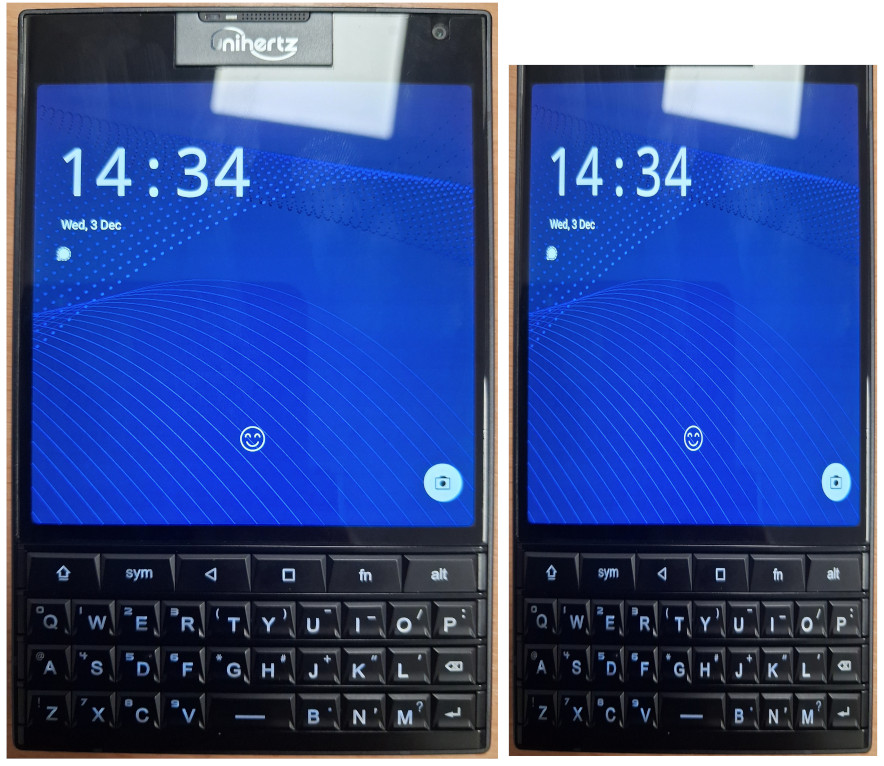
    • First and foremost this device is a really odd size and shape. It’s just not ergonomic. The phone is heavy, has sharp edges, and is extremely wide and thick. The width I understand, they had to incorporate the Blackberry Passport screen, and it’s square so seeing as though they were set on using that display there wasn’t much they could do. On the other hand though I can’t see any excuse for the excessive thickness of this device. The battery is average sized, and aside from the physical keyboard there are no components it has that any other phone doesn’t. I also don’t see a reason for the excess space above the screen. The selfie camera and microphone could’ve been incorporated into a space a quarter of the height. Below (excuse my poor butchery, I’m no graphic designer) I’ve adjusted the size of the Titan 2 to something I’d like to see in the future. I’ve cut the width down by 25% and trimmed down the phones forehead. Unihertz; if you’re reading, please consider something with dimensions like this in the future!
    • The square screen. While it’s good for text based work and reading, it’s not much good for anything else. All of the apps and mobile websites are built assuming the device is a vertical rectangle. Things don’t fit well, and the experience becomes clunky when I have to start using mini mode. On the plus side the quality of the LCD panel is excellent. Clarity is great, brightness too and for a 60Hz refresh rate it feels very smooth.
    • The included case. I appreciate that one was included, just as I appreciate the screen protectors that were pre-applied. It has to be said though that this case is awful. It has sharp edges which make using the phone uncomfortable, and adds enough thickness to the phone to make it unmanageable. I’ve resorted to now using the phone without a case, and having to deal with the constant attempts of the fingerprint reader when I’m handling the phone.
    • The stock launcher. Overall it isn’t terrible, but there are little things missing such as the ability to stop new apps appearing on my home screen, or not being able to make folders in the app drawer.
    • The stock keyboard app. Thankfully I’m using Pastiera now so I don’t have to deal with the “Kika” keyboard, but the on screen element due to the lack of a comprehensive set of physical symbol keys is terribly executed and needs an overhaul. I did not purchase a phone with a physical keyboard to have 1/4 of my screen taken up with the on screen keyboard.
    • The keyboard. This is a joy to type on. The tactility and weight of the keys is perfect. The size and shape of the buttons mean I get no mis typed letters even typing with the soft part of my thumbs. I’ve managed to get typing at a good speed relatively quickly. The top row is a disaster though. A dedicated home key is missing, and the FN key really isn’t sure what it’s supposed to be. I also feel like putting the shift and alt keys on the top row rather than the bottom was a strange choice to make.
    • The cameras. I don’t expect Google Pixel levels of photography from a device like this. However, trying to produce an image that’s even usable on this phones cameras is a challenge. Lighting, colour balance, shutter speed and noise are all dreadful. I haven’t seen cameras this bad since I tried the HMD Pulse for a while.

    I really hope that the huge boom of interest in this phone spurs Unihertz to continue down this path of making qwerty phones. There’s clearly a demand for it. If we do see a “Titan 2 Slim” I’d love to see a lot of what I’ve written above resolved.

    For me I’d be willing to largely ignore the downsides I’ve listed above if only the cameras were better. Having a young Son there are memories that I want to capture happening regularly and I can’t always have my DSLR at the ready.

    This unfortunately meant my SIM card had to come back out of the Titan 2. It will still see regular use in my ownership; I enjoy journaling on this device and organising my life on this device is also a pleasant experience. But it will not get use as my main phone, as much as I wanted it to. The smartphone as we know it is a well established form factor, it’ll take some refinement before a qwerty phone can challenge it.

  • Unihertz Titan 2 – Promising progress and community interest.

    It’s been a couple of months now since us backers of the Titan 2 Kickstarter campaign started to receive our devices. Aside from the disastrous communications during the production and shipping I’m happy to report that the actual phones are proving to be excellent!

    So far we have received 2 OTA updates, which seems to indicate that Unihertz are listening to the community and are being proactive in their approach. Hopefully this enthusiasm continues.

    The first OTA fixed a very serious issue: The majority of devices would experience phantom touch issues with the screen, the phone would detect and respond to touches that didn’t happen, causing all sorts of serious issues for people. Thankfully by the time I’d received my Titan 2 this update had been released, so I didn’t have to experience this issue.

    The second OTA was minor fixes and improvements. It fixed a couple of minor bugs such as the programmable buttons not always responding when the screen was off, and I believe Unihertz have made some improvements to the standard “Kika” keyboard.

    More encouraging is the community that is forming around this phone. Already we have a very early release of LineageOS for this device, which can be found here: GitHub – agreenbhm/Unihertz-Titan-2-LineageOS. Unfortunately on this one it doesn’t look like any updates have been made since its initial release, but it may prove to be a good foundation for someone else to build on.

    There has also been a keyboard app, developed especially for the Titan 2 released called “Pastiera”. Since its initial release I’ve been using this over Kika. It was better than Kika in its first version, and it’s since had a couple of updates which have improved it even more. I highly recommend trying this is you have a Titan 2, it can be found here: Releases · palsoftware/pastiera.

    While I don’t currently have a SIM card in my Titan 2, if we start seeing good results from GCam ports to the level usable photos can be produced that may change. The only thing keeping me from daily driving this device is the lacklustre camera.

    Overall though I’m very glad I made the decision to keep my Titan 2, it’s been a fun experience already and I’m excited to see how this device grows with future updates and community engagement. Long may it continue!